跳转到主要内容
本指南将引导您在 Shopify 店铺中安装 Kleep。Kleep 提供三项主要功能:智能尺码指南(Kleep Sizing)、相似商品推荐(Kleep Similar Products)以及优化后的商品搜索(Kleep Search)。

集成流程概览

以下是从合同签署到正式上线及后续阶段的完整流程。端到端集成通常需要约 5–6 周

入驻准备

1

合同签署并完成账单设置

合同签署后,您的 Kleep 代表将通过 GoCardless 启动账单流程:设置自动扣款 →
2

入驻启动会议

与您的 Kleep 代表进行简短通话,就时间安排、技术联系人及店铺特定需求达成一致,然后开始安装。
3

填写入驻表单

启动会议结束后,我们将请您提供公司、账单、店铺环境及退货设置等相关信息,以便我们准备集成工作。填写入驻表单 →填写约需 5 分钟。提交后,我们的团队将审核您的回复,并在 1 个工作日内确认后续步骤。
4

提供您的 Shopify 网址与协作者代码

请将您的店铺地址(例如 your-store.myshopify.com)以及协作者请求代码发送给我们,以便我们申请访问您的店铺。
有多个 Shopify 店铺? 如果您有多个 Shopify 实例(例如不同地区或品牌),请为每个店铺提供一个协作者代码——每家店铺需要单独的代码。
不确定在哪里找到这些信息?在您的 Shopify 后台,前往 设置 → 用户和权限——顶部显示您的 myshopify.com 网址,协作者请求代码列在 协作者 部分下方。详情请参阅 Shopify 的帮助文章:协作者账户
5

接受我们的协作者请求

我们将从 Shopify 合作伙伴账户发送协作者访问请求。请在您的 Shopify 后台的 设置 → 用户和权限 → 协作者 中批准。
6

在每个店铺安装 Kleep 应用

获得协作者访问权限后,我们将为每家店铺发送应用安装链接。您需要在每个希望启用 Kleep 的 Shopify 店铺中单独安装 Kleep 应用。
7

选择 CTA 位置

查看我们为”查找我的尺码”按钮建议的位置,并选择最适合您店面的方案:CTA 定位 Figma →

安装与测试

1

我们在复制主题上安装 Kleep

我们的团队会复制您当前的 Shopify 主题,并在副本上安装 Kleep,确保您的线上店面在测试期间保持不变。
2

预览与反馈

我们将向您发送一个私有预览链接,以便您端到端测试集成效果,并提出任何反馈或需要调整的地方。
3

正式上线

待您确认后,我们将在您的线上主题中发布 Kleep。

集成后

1

客户端仪表板访问

我们为您的团队提供 Kleep 仪表板 的访问凭据,您可以实时监控 Kleep 的性能 KPI。
2

启用尺码反馈功能

我们在您的仪表板中启用 尺码反馈,让您的团队能够利用真实的试穿数据优化 Kleep 的尺码建议。

1. 功能介绍

Kleep 通过安装事先创建的自定义应用集成到您的店铺中。它允许:
  1. 在商品页面上添加”查找我的尺码”CTA 按钮
  2. 直接在主题编辑器中自定义其界面
我们的应用还会自动创建商品、订单和退货数据流,以保持数据实时更新。这些数据每天获取一次。 安装后,应用会创建一个 WebPixel,用于跟踪多项指标,以便我们推导出解决方案的投资回报率。

2. 相似商品功能

“相似商品”在某个尺码缺货时推荐替代商品,通过向客户提供相关替代品来提升转化率。 可用显示模式
模式说明
弹窗(自动)鼠标悬停在尺码上时自动弹出(桌面端)/ 按钮(移动端)
按钮(自动)缺货时在购物车附近自动显示 CTA 按钮
仅自定义按钮您通过主题编辑器手动放置按钮
弹窗 + 自定义自动弹窗 + 额外自定义按钮
按钮 + 自定义自动按钮 + 额外自定义按钮
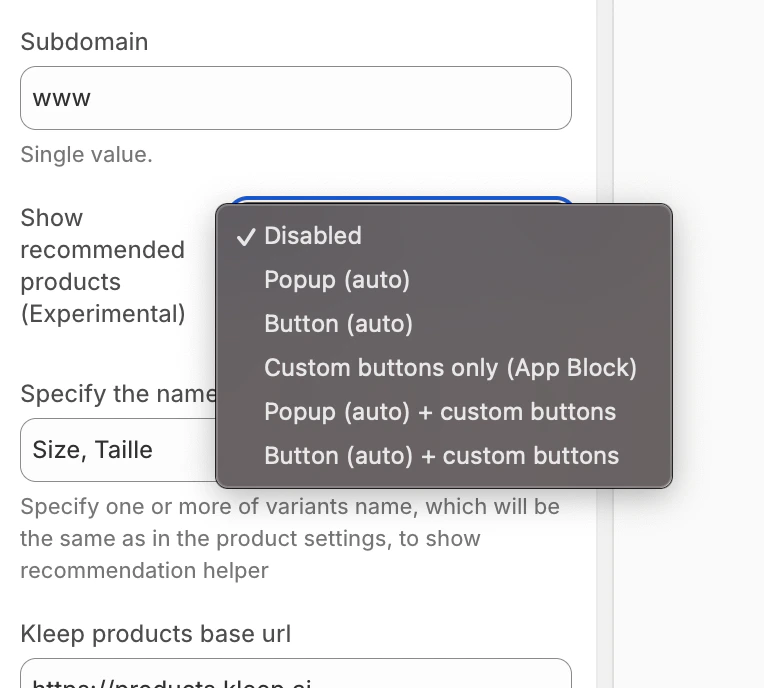
配置 第一步:选择显示模式 在 Kleep 应用嵌入设置中,找到 “显示推荐商品” 选项,并从下拉菜单中选择所需模式。 Screenshot_2025-12-09_at_11.48.24.png 相似商品模式选择 添加自定义按钮(适用于自定义模式) 如果您选择了包含”自定义”的模式,可以在特定位置添加按钮:
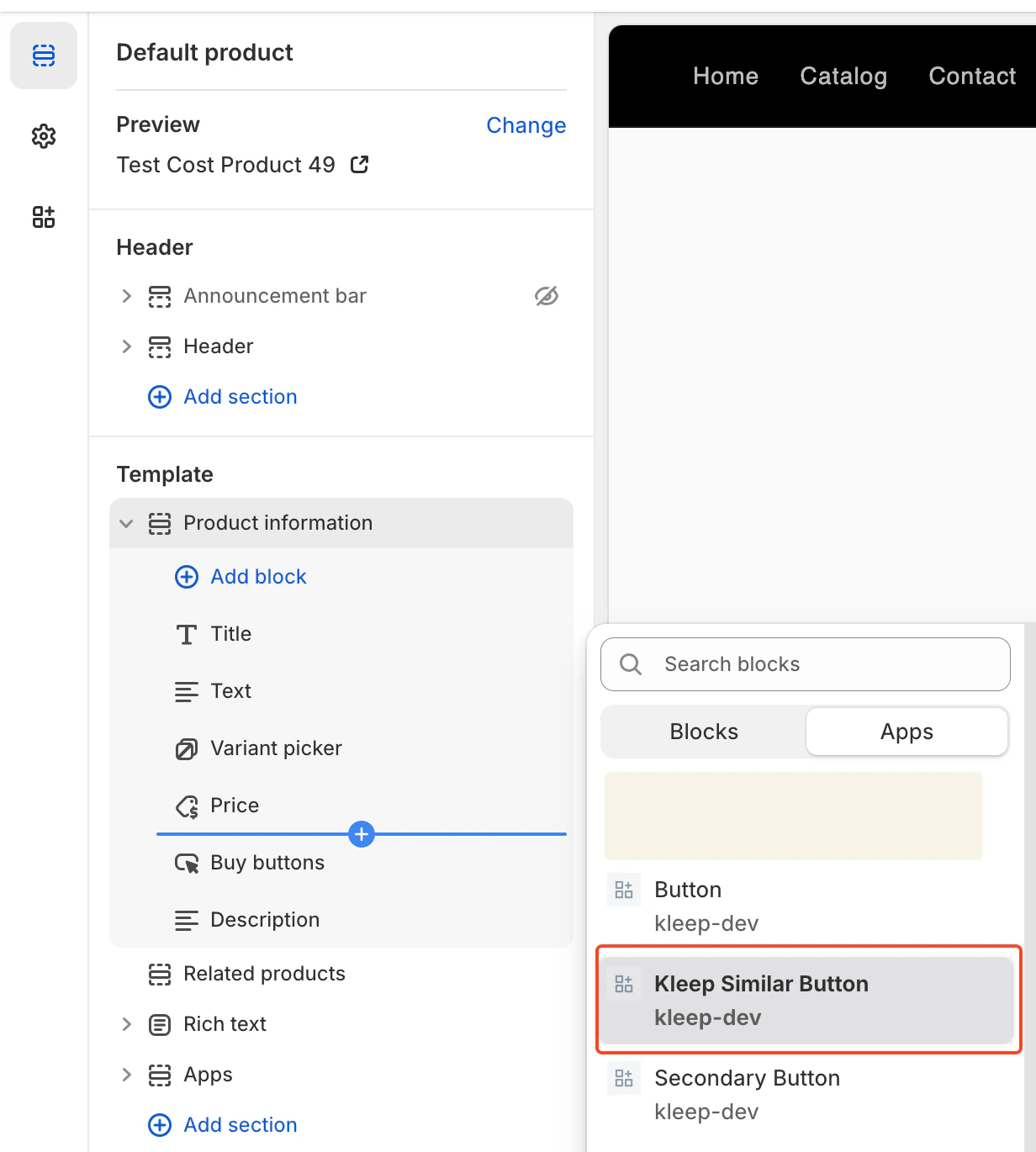
  1. 在主题编辑器中进入 商品页面 模板
  2. 在所需区域中,点击 添加区块
  3. 点击 应用 标签,选择 “Kleep Similar Button”
  4. 将区块放置在所需位置并保存
image.png 添加 Kleep 相似商品按钮区块
相似商品按钮仅在某个商品规格缺货时显示。如果您在所有商品上都看不到它们,这是正常现象。
添加多个按钮 您可以在商品页面上添加任意数量的相似商品按钮。要允许多个按钮,组件必须设置为以下之一:custom_buttonspopup+custombutton+custom 适用于 OS 2.0 主题:
  • 前往 在线商店 → 自定义
  • 打开 商品页面 模板
  • 点击 添加区块 → Kleep Similar Button
  • 如需 2 个以上按钮,重复以上操作
每个按钮仅在所选规格缺货时自动显示。

3. Kleep 搜索功能

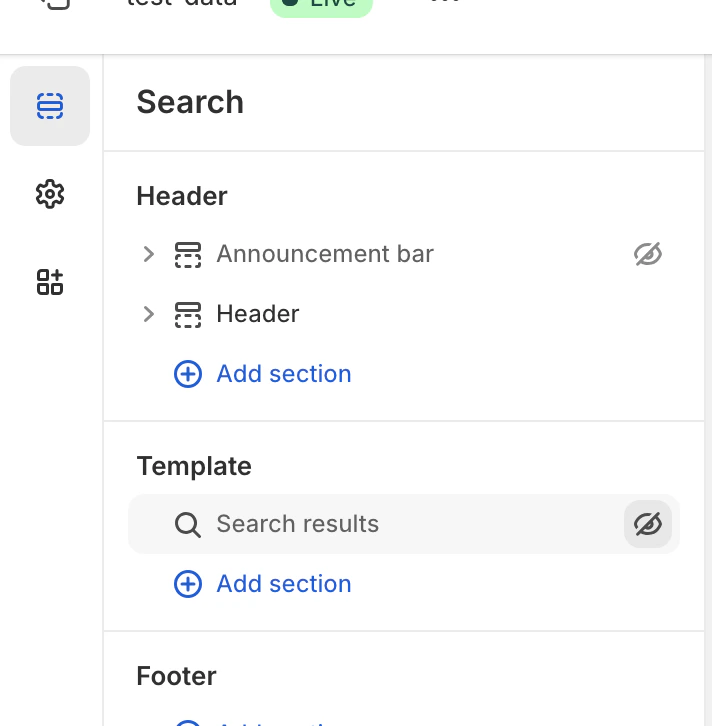
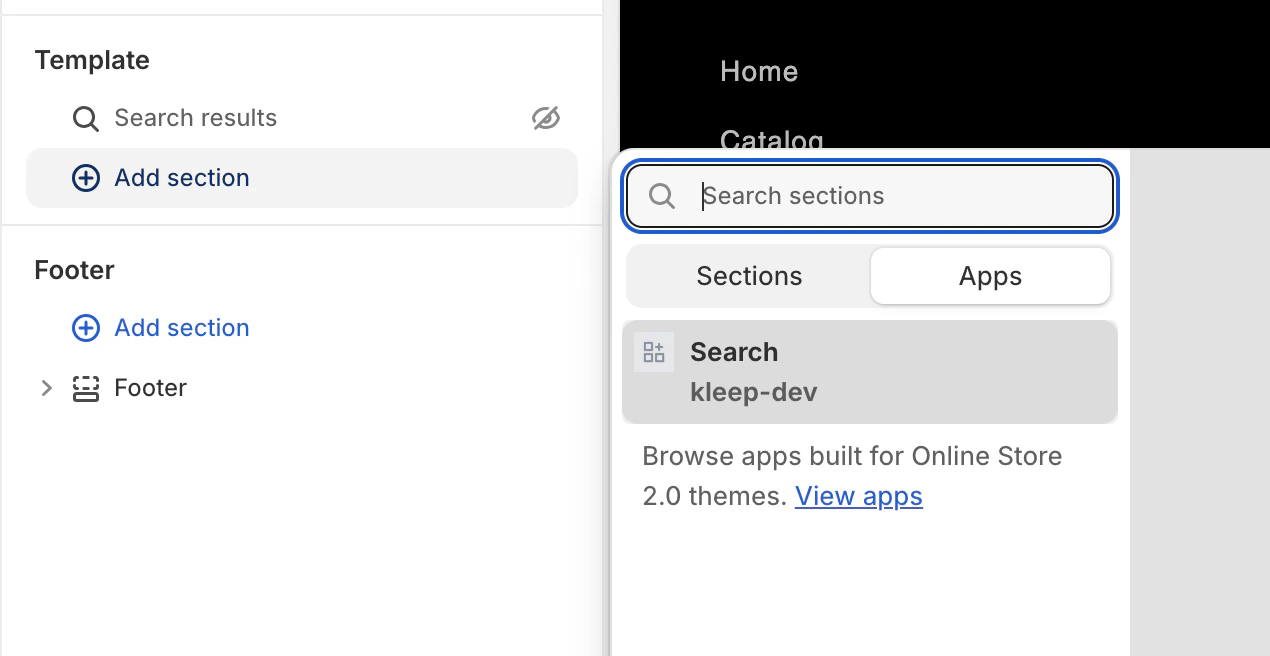
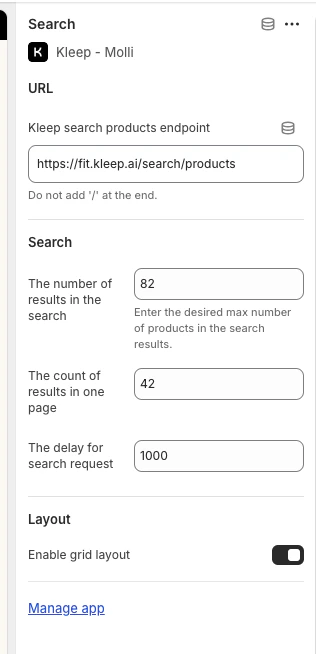
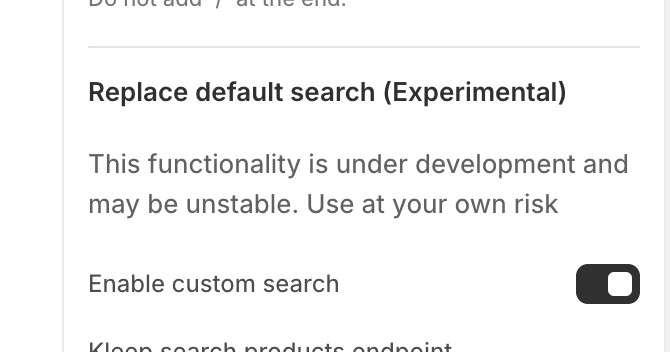
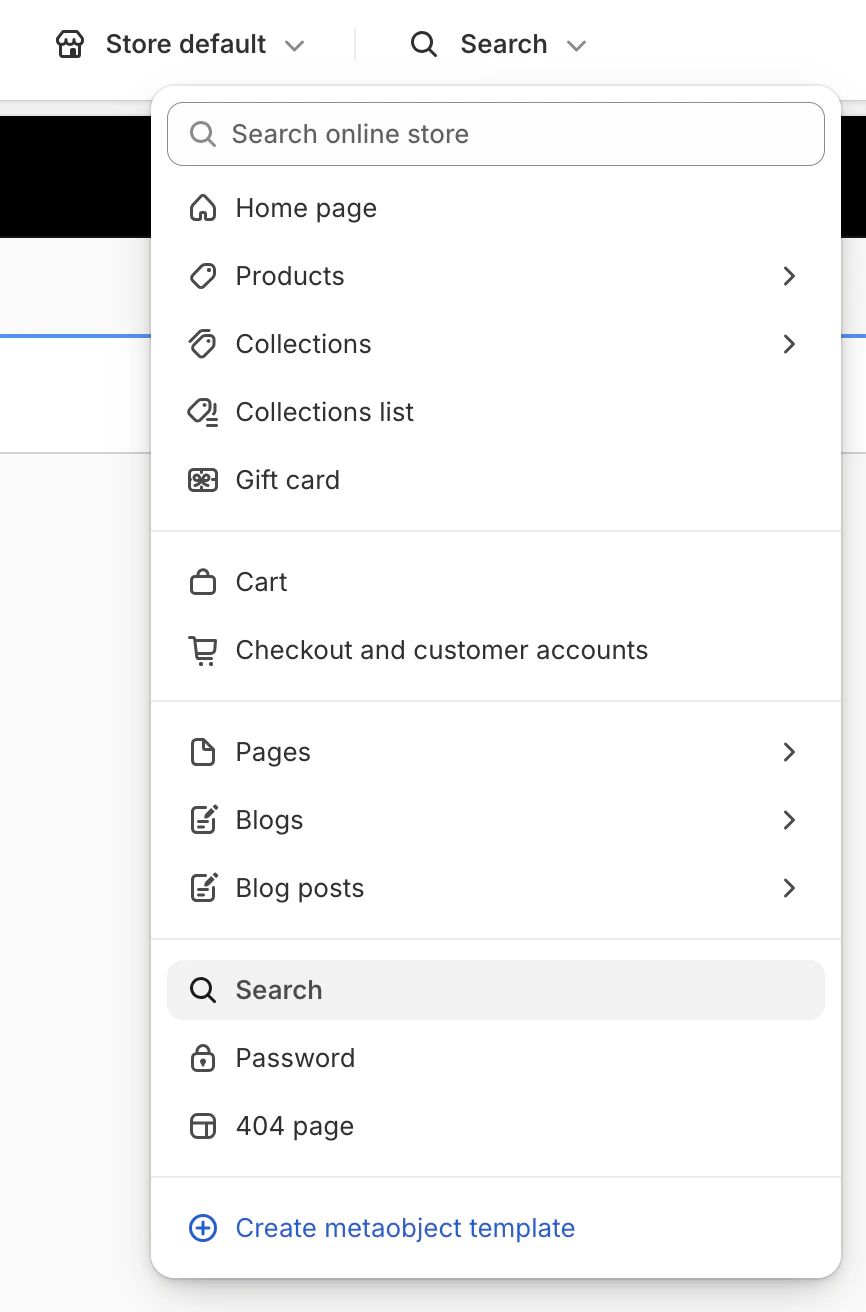
Kleep Search 将原生 Shopify 搜索替换为优化后的搜索,具备尺码筛选和个性化推荐功能。 第一步:启用自定义搜索 在 Kleep 应用嵌入设置中,启用 “启用自定义搜索” 选项。 Screenshot_2025-07-28_at_17.17.44.png 启用自定义搜索 第二步:访问搜索模板 在主题编辑器中,点击顶部下拉菜单(默认显示”首页”),从模板列表中选择 “搜索” Screenshot_2025-07-28_at_17.18.59.png 选择搜索模板 第三步:隐藏原生搜索 在模板部分,点击眼睛图标隐藏或删除原生 “搜索结果” 区块。 Screenshot_2025-07-28_at_17.19.32.png 隐藏原生搜索 第四步:添加 Kleep 搜索区块 点击 添加区域,然后在 应用 标签中选择 “Search”(kleep-dev)。 Screenshot_2025-07-28_at_17.19.48.png 添加 Kleep 搜索区块 第五步:配置选项 点击您添加的搜索区块,访问设置:结果数量、网格/列表显示、搜索延迟等。 Screenshot_2025-08-13_at_13.29.19.png 搜索配置选项
4. 退货集成(可选)

如果您使用退货管理平台,Kleep 可以集成退货数据以改善尺码建议。 支持的退货服务商
  • Global-e
  • Aftership
  • Fast Return
  • Return Go
  • 其他(请联系我们)
配置
  1. 在 Kleep 仪表板中,前往 设置 → 退货
  2. 选择您的退货服务商
  3. 按照特定服务商的说明连接您的账户
如果您的服务商未在列表中,请发送邮件至 support@kleep.ai 联系我们——我们可以通过 SFTP 或 API 设置自定义集成。

5. 事件跟踪与数据分析

Kleep 自动跟踪用户交互用于数据分析。请确保在上线前跟踪功能正常运行。 已跟踪事件
事件说明
kleep_button_click用户点击了尺码指南按钮
kleep_drawer_open尺码指南抽屉已打开
kleep_size_recommended已显示尺码建议
kleep_add_to_cart用户通过 Kleep 将商品添加到购物车
kleep_similar_click用户点击了相似商品
验证 要验证事件是否正常触发:
  1. 打开浏览器的开发者工具(F12)
  2. 前往 网络 标签
  3. 按”kleep”过滤
  4. 与尺码指南按钮交互
  5. 您应该能看到每个事件的 API 调用
上线前: 确保至少触发 5 个事件且数据有效。完成一次完整的用户旅程(点击按钮 → 尺码建议 → 加入购物车)以验证集成效果。

6. CSS 自定义

您可以通过添加自定义 CSS 来自定义 Kleep 元素(按钮、弹窗、搜索)的外观。 在哪里添加 CSS 在 Kleep 应用嵌入设置中,您会找到一个 “输入自定义 CSS 样式” 字段。将您的自定义 CSS 粘贴到其中。 Screenshot_2025-08-13_at_13.25.30.png 自定义 CSS 字段 自定义示例
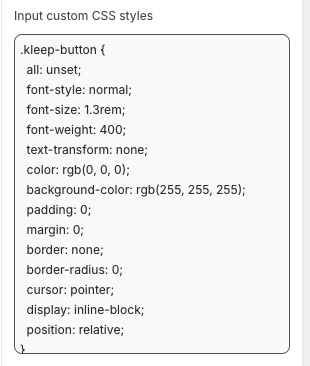
.kleep-button {
  all: unset;
  font-style: normal;
  font-size: 1.3rem;
  font-weight: 400;
  text-transform: none;
  color: rgb(0, 0, 0);
  background-color: rgb(255, 255, 255);
  padding: 0;
  margin: 0;
  border: none;
  border-radius: 0;
  cursor: pointer;
  display: inline-block;
  position: relative;
}

7. 多环境配置

如果您有多个 Shopify 环境(开发、预发布、生产),您需要为每个环境配置 Kleep。 各环境设置
  1. 生产店铺 — 主店铺,完整配置
  2. 预发布/开发店铺 — 在推送到生产环境之前用于测试
对于每个环境:
  1. 安装 Kleep 应用
  2. 启用应用嵌入
  3. 联系您的 Kleep CSM 将该环境链接到您的账户
在应用到生产环境之前,始终在预发布环境中测试更改。
环境专用网址 请向您的 Kleep CSM 提供:
  • 生产网址:https://www.yourbrand.com
  • 预发布网址:https://staging.yourbrand.com(如适用)
  • 开发网址:https://dev.yourbrand.com(如适用)

7.5 CTA 按钮与相似商品 — 完整安装指南

有关安装 Kleep CTA 按钮和相似商品功能的完整技术参考(包括所有 Liquid 代码、设置模式和辅助按钮设置),请参阅以下专属指南: CTA 按钮与相似商品 — 完整安装指南

8. 经典主题 - 尺码指南设置

经典主题(也称为”旧版”或在 Online Store 2.0 之前创建的主题)不支持应用区块。安装需要修改 Liquid 代码。
本节需要具备 Shopify 开发知识(Liquid)。
前提条件
  • 可访问主题代码编辑器(在线商店 → 主题 → 编辑代码
  • 必须在您的 Shopify 后台启用 Kleep 应用嵌入(在线商店 → 主题 → 自定义 → 应用嵌入 → Kleep
第一步:启用应用嵌入 在您的 Shopify 后台,前往 在线商店 → 主题 → 自定义 → 应用嵌入,开启 Kleep 应用。 第二步:调用代码片段 将以下代码粘贴到您希望 Kleep 显示的位置。它必须是 snippets 文件夹内 Product info 区块的一部分:
{% render 'kleep-button', cms: section.settings %}
第三步:创建按钮代码片段 在您的 snippets 文件夹中创建名为 kleep-button.liquid 的新文件,并将以下内容放入其中:
<button
  type="button"
  style="display: none;{% if cms.font_family and cms.default_font_family == false %}font-family: '{{ cms.font_family }}' ;{% endif %}font-style: {{ cms.text_style }}; font-size: {{ cms.text_size }}px; font-weight: {{ cms.text_weight }}; text-transform: {{ cms.text_transform }}; color: {{ cms.text_color }}; background-color: {{ cms.bg_color }}; padding: {{ cms.padding_t }}px {{ cms.padding_r }}px {{ cms.padding_b }}px {{ cms.padding_l }}px;{% if cms.center %} margin: {{ cms.margin_y }}px auto;{% else %} margin: {{ cms.margin_y }}px {{ cms.margin_x }}px;{% endif %}; border: {{ cms.border_color }} {{ cms.border_width }}px solid; border-radius: {{ cms.border_radius }}px;"
  class="kleep-button"
  id="kleep-size-button"
  data-product-id="{{ product.id }}"
>
  <span class="kleep-wrapper-content">
    {% if cms.text_underline %}
      <span
        style="position: absolute; width: calc(100% + 2px); height: 1px; bottom: -{{ cms.text_underline_offset }}px; left: 0; background-color: {{ cms.text_color }};"
      ></span>
    {% endif %}

    {% if cms.image_url != blank %}
      <img
        height="{{ cms.image_size }}"
        width="{{ cms.image_size }}"
        src="{{ cms.image_url }}"
        loading="lazy"
        alt="Kleep button image"
      >
    {% endif %}

    <span class="kleep-btn-text">
      <span class="kleep-default">
        {% if cms.custom_button_text_toggle %}
          {{ cms.custom_find_size_text }}
        {% else %}
          {{ 'blocks.button.text.without_hash' | t }}
        {% endif %}
      </span>
      <span style="display: none;" class="kleep-custom">
        {% if cms.custom_button_text_toggle %}
          {{ cms.custom_recommended_size_text }}{% if localization.language.iso_code == "fr" %}&nbsp;{% endif %}<span class="kleep-colon">:</span>
        {% else %}
          {{ 'blocks.button.text.with_hash' | t }}{% if localization.language.iso_code == "fr" %}&nbsp;{% endif %}<span class="kleep-colon">:</span>
        {% endif %}
        <span class="kleep-custom-res"></span>
      </span>
    </span>
  </span>

  <span
    style="display: none; color: {{ cms.text_color }}; border-top-color: {{ cms.text_color }};"
    class="kleep-spinner"
    id="size-spinner"
  ></span>
</button>
第四步:添加设置模式 在区域文件末尾将以下选项添加到您的设置模式中:
{
  "type": "header",
  "content": "Button text",
      "info": "If you enable this feature, the button text you enter will be replaced for all languages in your store"
    },
    {
      "type": "checkbox",
      "default": false,
      "id": "custom_button_text_toggle",
      "label": "Enable custom button text"
    },
    {
      "type": "text",
      "id": "custom_find_size_text",
      "label": "Find my best size text",
      "info": "What text will display instead of\"Find my best size\"?"
    },
    {
      "type": "text",
      "id": "custom_recommended_size_text",
      "label": "Recommended size text",
      "info": "What text will display instead of\"Recommended size\"?"
    },
    {
      "type": "header",
      "content": "Image"
    },
    {
      "type": "url",
      "id": "image_url",
      "label": "Url Image"
    },
    {
      "type": "range",
      "id": "image_size",
      "min": 0,
      "max": 80,
      "step": 2,
      "unit": "px",
      "label": "Image size (square)",
      "default": 20
    },
    {
      "type": "header",
      "content": "CSS Styles"
    },
    {
      "type": "checkbox",
      "default": true,
      "id": "default_font_family",
      "label": "Theme font",
      "info": "If checked, the css variable `--font-body-family` is used"
    },
    {
      "type": "font_picker",
      "id": "font_family",
      "label": "Font Family",
      "default": "helvetica_n4"
    },
    {
      "type": "select",
      "id": "text_style",
      "label": "Text style",
      "default": "normal",
      "options": [
        { "label": "Normal", "value": "normal" },
        { "label": "Italic", "value": "italic" },
        { "label": "Oblique", "value": "oblique" }
      ]
    },
    {
      "type": "select",
      "id": "text_transform",
      "label": "Text transformation",
      "default": "none",
      "options": [
        { "label": "Normal", "value": "none" },
        { "label": "Capitalize", "value": "capitalize" },
        { "label": "Uppercase", "value": "uppercase" },
        { "label": "Lowercase", "value": "lowercase" }
      ]
    },
    {
      "type": "select",
      "id": "text_weight",
      "label": "Text weight",
      "default": "400",
      "options": [
        { "label": "100", "value": "100" },
        { "label": "200", "value": "200" },
        { "label": "300", "value": "300" },
        { "label": "400", "value": "400" },
        { "label": "500", "value": "500" },
        { "label": "600", "value": "600" },
        { "label": "700", "value": "700" },
        { "label": "800", "value": "800" },
        { "label": "900", "value": "900" }
      ]
    },
    {
      "type": "range",
      "id": "text_size",
      "min": 2,
      "max": 50,
      "step": 2,
      "unit": "px",
      "label": "Font size",
      "default": 16
    },
    {
      "type": "checkbox",
      "id": "text_underline",
      "label": "Text underline",
      "default": false
    },
    {
      "type": "range",
      "id": "text_underline_offset",
      "min": 1,
      "max": 20,
      "step": 1,
      "unit": "px",
      "label": "Underline offset",
      "default": 2
    },
    {
      "type": "color",
      "id": "text_color",
      "label": "Button text color",
      "default": "#ffffff"
    },
    {
      "type": "color",
      "id": "bg_color",
      "label": "Background color",
      "default": "#000000"
    },
    {
      "type": "color",
      "id": "border_color",
      "label": "Border color",
      "default": "#000000"
    },
    {
      "type": "range",
      "id": "border_width",
      "min": 0,
      "max": 8,
      "step": 1,
      "unit": "px",
      "label": "Border width",
      "default": 0
    },
    {
      "type": "header",
      "content": "Spacing"
    },
    {
      "type": "checkbox",
      "id": "center",
      "label": "Center the button",
      "default": false,
      "info": "This will override 'Horizontal margin'"
    },
    {
      "type": "range",
      "id": "margin_y",
      "min": 0,
      "max": 80,
      "step": 2,
      "unit": "px",
      "label": "Vertical margin",
      "default": 0
    },
    {
      "type": "range",
      "id": "margin_x",
      "min": 0,
      "max": 80,
      "step": 2,
      "unit": "px",
      "label": "Horizontal margin",
      "default": 0
    },
    {
      "type": "range",
      "id": "padding_t",
      "min": 0,
      "max": 40,
      "step": 2,
      "unit": "px",
      "label": "Padding top",
      "default": 12
    },
    {
      "type": "range",
      "id": "padding_r",
      "min": 0,
      "max": 40,
      "step": 2,
      "unit": "px",
      "label": "Padding right",
      "default": 16
    },
    {
      "type": "range",
      "id": "padding_b",
      "min": 0,
      "max": 40,
      "step": 2,
      "unit": "px",
      "label": "Padding bottom",
      "default": 12
    },
    {
      "type": "range",
      "id": "padding_l",
      "min": 0,
      "max": 40,
      "step": 2,
      "unit": "px",
      "label": "Padding left",
      "default": 16
    },
    {
      "type": "range",
      "id": "border_radius",
      "min": 0,
      "max": 40,
      "step": 2,
      "unit": "px",
      "label": "Border radius",
      "default": 0
    }
第五步:验证 在 Shopify 主题自定义区域验证更新。在商品信息区块设置中配置视觉效果。 可选:辅助按钮 如果您想添加辅助按钮,请在您的 snippets 文件夹中创建名为 kleep-secondary-button.liquid 的新文件:
<div class="kleep-secondary-button-box">
    <button
                type="button"
                style="{% if cms.kleep_font_family and cms.kleep_default_font_family == false %}font-family: '{{ cms.kleep_font_family }}' ;{% endif %}font-style: {{ cms.kleep_text_style }}; font-size: {{ cms.kleep_text_size }}px; font-weight: {{ cms.kleep_text_weight }}; text-transform: {{ cms.kleep_text_transform }}; color: {{ cms.kleep_text_color }}; background-color: {{ cms.kleep_bg_color }}; {% if cms.kleep_center %} margin: {{ cms.kleep_margin_y }}px auto;{% else %} margin: {{ cms.kleep_margin_y }}px {{ cms.kleep_margin_x }}px;{% endif %}; border: {{ cms.kleep_border_color }} {{ cms.kleep_border_width }}px solid; border-radius: {{ cms.kleep_border_radius }}px;"
                class="kleep-secondary-button"
                onclick="kleep_cta();"
                data-product-id="{{ product.id }}"
        >
        <span class="kleep-wrapper-content">
          {% if cms.kleep_text_underline %}
              <span style="position: absolute; width: calc(100% + 2px); height: 1px; bottom: -{{ cms.kleep_text_underline_offset }}px; left: 0; background-color: {{ cms.kleep_text_color }};"></span>
          {% endif %}
    
            {% if cms.kleep_image_url != blank %}
                <img height="{{ cms.kleep_image_size }}" width="{{ cms.kleep_image_size }}" src="{{ cms.kleep_image_url }}"
                     loading="lazy" alt="Kleep button image">
            {% endif %}
    
          <span class="kleep-secondary-btn-text">
            <span class="kleep-secondary-default">
              {{ 'kleep.button.text.without_hash' | t }}
            </span>
            <span style="display: none;" class="kleep-secondary-custom">
              {{ 'kleep.button.text.with_hash' | t }}:
              <span class="kleep-secondary-custom-res"></span>
            </span>
          </span>
        </span>
    
            <span
                    style="display: none; color: {{ cms.kleep_text_color }}; border-top-color: {{ cms.kleep_text_color }};"
                    class="kleep-secondary-spinner"
            ></span>
        </button>
    </div>
将以下代码粘贴到您希望 Kleep 显示的位置。它必须是 snippets 文件夹内 Product info 区块的一部分。
{% render 'kleep-secondary-button', cms: section.settings %}

9. 经典主题 - 相似商品设置

第一步:创建代码片段 创建文件 snippets/kleep-similar-button.liquid,内容如下:
{% assign cms = block.settings %}
    {% assign domain = shop.domain %}
    {% assign translated_similar = '' %}
    {% assign translated_similar_missing = true %}
    
    {%- assign domain_key = domain | prepend: 'www.' | append: '.recommended' -%}
    {% assign raw_domain_similar = domain_key | t %}
    
    {% unless raw_domain_similar contains 'Translation missing'
      or raw_domain_similar contains domain
    %}
      {% assign translated_similar = raw_domain_similar %}
      {% assign translated_similar_missing = false %}
    {% endunless %}
    
    {%- if translated_similar_missing -%}
      {% assign raw_global_similar = 'kleep.recommended.text.btn' | t %}
      {% unless raw_global_similar contains 'Translation missing' %}
        {% assign translated_similar = raw_global_similar %}
        {% assign translated_similar_missing = false %}
      {% endunless %}
    {%- endif %}
    
    <button
      type="button"
      class="kleep-similar-btn {{ block.settings.extra_classes }}"
      data-kleep-similar
      data-product-id="{{ product.id }}"
      {% if product.selected_or_first_available_variant %}
        data-variant-id="{{ product.selected_or_first_available_variant.id }}"
      {% endif %}
      style="
        display:none; align-items:center; gap:.5rem;
        {% if block.settings.center %}margin: {{ block.settings.margin_y }}px auto; justify-content:center;{% else %}margin: {{ block.settings.margin_y }}px {{ block.settings.margin_x }}px;{% endif %}
      "
    >
      <span>
        {% if cms.custom_text != blank %}
          {{ cms.custom_text }}
        {% else %}
          {% if translated_similar_missing %}
            {{ 'kleep.recommended.text.btn' | t }}
          {% else %}
            {{ translated_similar }}
          {% endif %}
        {% endif %}
      </span>
    </button>
第二步:渲染代码片段 在您希望按钮显示的位置插入以下代码行:
{% render 'kleep-similar-button' %}
典型放置位置:在规格选择器下方或加入购物车表单附近。 第三步:启用正确的模式 由于经典主题无法插入 OS 2.0 区块,组件必须使用以下之一:
  • custom_buttons
  • popup+custom
  • button+custom
添加多个按钮 要创建多个按钮,只需在商品模板的不同区域放置代码片段:
{% render 'kleep-similar-button' %}
每次调用代码片段都会创建一个额外的按钮。每个按钮仅在所选规格缺货时自动显示。

10. 翻译(i18n)

将以下翻译添加到您的主题语言文件中。 英文(en.json
{
  "kleep": {
    "button": {
      "text": {
        "without_hash": "Find my ideal size",
        "with_hash": "Ideal size"
          }
        },
        "recommended": {
          "text": {
            "btn": "View similar",
            "hint": "Size unavailable",
            "link": "See similar products"
          }
        },
        "search": {
          "text": {
            "inputPlaceholder": "Search...",
            "productsBlockTitle": "Products",
            "clearButton": "Clear"
          }
        },
        "searchPage": {
          "text": {
            "header": "search results",
            "query": "Results for",
            "submit": "Search",
            "input": "Search the store",
            "viewProduct": "View product"
          }
        }
      }
    }
法文(fr.json
{
  "kleep": {
    "button": {
      "text": {
        "without_hash": "Trouver ma taille idéale",
        "with_hash": "Taille idéale"
          }
        },
        "recommended": {
          "text": {
            "btn": "Voir similaire",
            "hint": "Taille indisponible",
            "link": "Voir des produits similaires"
          }
        },
        "search": {
          "text": {
            "inputPlaceholder": "Recherche...",
            "productsBlockTitle": "Produits",
            "clearButton": "Effacer"
          }
        },
        "searchPage": {
          "text": {
            "header": "résultats de la recherche",
            "query": "Résultats pour",
            "submit": "Recherche",
            "input": "Rechercher dans la boutique",
            "viewProduct": "Voir le produit"
          }
        }
      }
    }
意大利文(it.json
{
  "kleep": {
    "button": {
      "text": {
        "without_hash": "Trova la mia taglia ideale",
        "with_hash": "Taglia ideale"
      }
    },
    "recommended": {
      "text": {
        "btn": "Visualizza simili",
        "hint": "Taglia non disponibile",
        "link": "Visualizza prodotti simili"
      }
    },
    "search": {
      "text": {
        "inputPlaceholder": "Cerca...",
        "productsBlockTitle": "Prodotti",
        "clearButton": "Cancella"
      }
    },
    "searchPage": {
      "text": {
        "header": "risultati della ricerca",
        "query": "Risultati per",
        "submit": "Cerca",
        "input": "Cerca nel negozio",
        "viewProduct": "Visualizza prodotto"
      }
    }
  }
}
德文(de.json
{
  "kleep": {
    "button": {
      "text": {
        "without_hash": "Finde meine ideale Größe",
        "with_hash": "Ideale Größe"
      }
    },
    "recommended": {
      "text": {
        "btn": "Ähnliche Ansicht",
        "hint": "Größe nicht verfügbar",
        "link": "Ähnliche Produkte ansehen"
      }
    },
    "search": {
      "text": {
        "inputPlaceholder": "Suchen...",
        "productsBlockTitle": "Produkte",
        "clearButton": "Klar"
      }
    },
    "searchPage": {
      "text": {
        "header": "Suchergebnisse",
        "query": "Ergebnisse für",
        "submit": "Suchen",
        "input": "Durchsuchen Sie den Shop",
        "viewProduct": "Produkt ansehen"
      }
    }
  }
}
西班牙文(es.json
{
  "kleep": {
    "button": {
      "text": {
        "without_hash": "Encontrar mi talla ideal",
        "with_hash": "Talla ideal"
      }
    },
    "recommended": {
      "text": {
        "btn": "Ver similares",
        "hint": "Talla no disponible",
        "link": "Ver productos similares"
      }
    },
    "search": {
      "text": {
        "inputPlaceholder": "Buscar...",
        "productsBlockTitle": "Productos",
        "clearButton": "Borrar"
      }
    },
    "searchPage": {
      "text": {
        "header": "resultados de búsqueda",
        "query": "Resultados para",
        "submit": "Buscar",
        "input": "Buscar en la tienda",
        "viewProduct": "Ver producto"
      }
    }
  }
}
日文(ja.json
{
  "kleep": {
    "button": {
      "text": {
        "without_hash": "自分に合うサイズを探す",
        "with_hash": "好みのサイズ"
      }
    },
    "recommended": {
      "text": {
        "btn": "類似商品を見る",
        "hint": "サイズがありません",
        "link": "類似商品を見る"
      }
    },
    "search": {
      "text": {
        "inputPlaceholder": "検索...",
        "productsBlockTitle": "商品",
        "clearButton": "クリア"
      }
    },
    "searchPage": {
      "text": {
        "header": "検索結果",
        "query": "検索結果",
        "submit": "検索",
        "input": "ストアを検索",
        "viewProduct": "商品を見る"
      }
    }
  }
}
韩文(ko.json
{
  "kleep": {
    "button": {
      "text": {
        "without_hash": "내 이상적인 사이즈 찾기",
        "with_hash": "추천 사이즈"
      }
    },
    "recommended": {
      "text": {
        "btn": "유사한 상품 보기",
        "hint": "사용 불가",
        "link": "유사한 상품 보기"
      }
    },
    "search": {
      "text": {
        "inputPlaceholder": "검색...",
        "productsBlockTitle": "상품",
        "clearButton": "지우기"
      }
    },
    "searchPage": {
      "text": {
        "header": "검색 결과",
        "query": "다음에 대한 결과",
        "submit": "검색",
        "input": "매장 검색",
        "viewProduct": "상품 보기"
      }
    }
  }
}
葡萄牙文(pt.json
{
  "kleep": {
    "button": {
      "text": {
        "without_hash": "Encontrar meu tamanho ideal",
        "with_hash": "Tamanho recomendado"
      }
    },
    "recommended": {
      "text": {
        "btn": "Ver similar",
        "hint": "Tamanho indisponível",
        "link": "Ver produtos similares"
      }
    },
    "search": {
      "text": {
        "inputPlaceholder": "Pesquisar...",
        "productsBlockTitle": "Produtos",
        "clearButton": "Limpar"
      }
    },
    "searchPage": {
      "text": {
        "header": "resultados da pesquisa",
        "query": "Resultados para",
        "submit": "Pesquisar",
        "input": "Pesquisar na loja",
        "viewProduct": "Ver produto"
      }
    }
  }
}

11. 技术参考

CTA 在商品详情页的位置 位置由 KleepSDK.getConstants() 内部的 DOM 选择器定义:
  • targetProductInfoBlockQueries – 指向商品详情主容器(标题、价格、尺码等)的选择器数组。脚本遍历这些选择器,并使用找到的第一个作为 CTA 或弹窗的插入点。
  • targetVariantQueries – 尺码/规格选项所在位置。找到商品信息区块后,脚本在其内部搜索规格元素(如尺码选择器)。每个规格 <label>(或等效元素)都成为附加弹窗 CTA 的目标。
弹窗与按钮(桌面端与移动端) 设备类型通过 checkIfMobile() 检测: 该函数根据移动设备列表(例如 iPhone、Android、iPad)检查浏览器的 navigator.userAgent 字符串。
  • 桌面端:CTA 以悬停弹窗形式显示在规格标签旁边
  • 移动端:由于触摸屏不支持悬停交互,脚本将悬停弹窗替换为单个按钮
商品参考配置 Kleep 使用商品参考在您的目录中匹配商品。请配置识别方式: 参考字段: 查找品牌商品参考的位置
  • Shopify SKU 字段
  • 元字段(指定哪个)
  • 标签(带前缀,例如 ref:ABC123
主商品提取: 如何从规格 SKU 推导主商品 ID
  • 示例:如果规格 SKU 为 ABC123-SABC123-MABC123-L,则主商品参考为 ABC123
  • 规则:取前 6 个字符 / 按分隔符拆分并取第一部分 / 自定义正则表达式
Kleep 仪表板 → 设置 → 商品参考 中进行配置。 自定义说明
  • 除调整选择器和 CSS 外,不提供其他位置/布局变体
  • 要更改外观(颜色、间距、字体等),请将您的 CSS 粘贴到 Kleep 应用嵌入设置中的 “输入自定义 CSS 样式” 框中

12. 上线前检查清单

上线前,请验证以下内容: 按钮显示
  • 按钮在至少 3 个商品页面上可见
  • 按钮在桌面端和移动端均正常工作
  • 无 CSS 冲突(按钮未被隐藏或错位)
  • 无累积布局偏移(CLS)问题——按钮不会导致页面跳动
  • 仅适用于经典主题: 提交内容已纳入版本控制
数据质量
  • 超过 98% 的商品已映射尺码指南
  • <1% 的规格存在缺失测量数据
  • 0 个孤立 SKU(没有分类映射的商品)
跟踪
  • 所有 5 个事件均正常触发
  • 已跟踪完整用户旅程(按钮 → 建议 → 购物车)
  • 数据有效性已验证
性能
  • JS 错误率 < 1%
  • API 延迟 P95 < 500ms
  • 监控已到位
用户旅程
  • 尺码指南正确打开
  • 建议正常显示
  • 从尺码指南加入购物车正常工作
  • 相似商品正常显示(如已启用)
  • 在所有设备上响应正常
✅ 确认所有项目后,请通知您的 Kleep CSM 进行上线前的最终质量验证。

13. 故障排查

按钮不显示
  • ☑️ 验证 Kleep 应用嵌入是否已启用(开关打开)
  • ☑️ 确保已保存主题更改
  • ☑️ 清除浏览器缓存并重新加载页面
  • ☑️ 检查商品是否已配置尺码规格
相似商品不显示
  • ☑️ 检查设置中的模式是否未设置为”已禁用”
  • ☑️ 按钮仅在某个规格缺货时显示
  • ☑️ 对于”自定义”模式,验证您是否已添加应用区块
搜索不工作
  • ☑️ 验证应用嵌入中的”启用自定义搜索”是否已启用
  • ☑️ 确保您已将 Kleep 搜索区块添加到搜索模板
  • ☑️ 检查原生搜索是否已隐藏
找不到 Kleep 应用区块 如果在点击”添加区块”时,“应用”标签中看不到 Kleep 区块,您的主题可能是经典主题。请参阅第 11-12 节了解替代安装说明。 数据映射问题
  • ☑️ 检查您的商品数据是否包含预期字段(标签、元字段等)
  • ☑️ 在 Kleep 仪表板 → 设置 → 数据映射 中验证映射
  • ☑️ 重新运行商品扫描以刷新检测值
事件未触发
  • ☑️ 检查浏览器控制台是否有 JavaScript 错误
  • ☑️ 验证没有广告拦截器或隐私扩展程序阻止 Kleep 请求
  • ☑️ 在无痕模式下测试
联系支持 如果您遇到此处未列出的问题,请联系 Kleep 团队:

感谢您使用 Kleep!🎉

我们的团队随时为您提供尺码指南的安装和优化支持。--- Kleep 完全依赖访客同意:脚本仅在通过您的 CMP 收集同意加载,您必须相应地条件化其加载。有关跟踪器完整列表、处理的数据、目的和法律依据、托管、子处理商及安全性,请参阅 Cookie、CMP 与数据隐私