
1. Summary
This document provides technical instructions for using the Kleep SFCC Cartridge to integrate the Kleep AI Virtual Sizing into the SFCC storefront.Glossary
| Term | Description |
|---|---|
| SFCC | Salesforce Commerce Cloud |
| Business Manager (BM) | The primary tool used to configure the SFCC platform and customer storefront (SFRA) |
| SFRA | StoreFront Reference Architecture |
2. Component Overview
Functional Overview
Kleep’s integration into your SFCC-based e-commerce platform offers a powerful solution to enhance the shopping experience for your customers and minimize product returns. The functional overview breaks down the key features and functionalities:-
AI Sizing Analysis:
- Kleep’s AI engine analyzes customer and product information to recommend the most suitable size for each product based.
-
Product recommendations:
- Kleep’s AI engine finds similar products to recommend within your catalogue when size is out of stock.
-
Shopping Confidence:
- Empowers customers with confidence in their purchasing decisions.
- Reduces the likelihood of product returns by ensuring accurate sizing recommendations.
-
Error Logging Mechanism:
- Kleep provides a robust error logging mechanism, capturing, and saving all service errors in a dedicated log file.
- Facilitates troubleshooting and maintenance by offering insights into any issues that may arise during operation.
Limitations, Constraints
Use of the Kleep cartridge requires credentials and keys from Kleep. Please contact your Kleep Account Manager. The cartridge is designed with multi-site, multi-locale and multi-currency support.Compatibility
- Salesforce Commerce Cloud API: The cartridge is specifically designed for version 22.7.
- SFRA Compatibility: Optimized for SFRA version 7.0.0. While it may work with earlier SFRA versions, compatibility has not been formally verified.
- SFCC API Versions: Potential compatibility with versions 21.7 and 21.2, though these have not undergone testing.
- Limitations:
- The cartridge is not suitable for use with Site Genesis and Headless storefronts.
- Incompatibility with SFCC API versions 19.10 and earlier.
Privacy, Payment
The Kleep cartridge collects and process user profile information for analytics. For additional privacy information, please contact your Kleep Account Manager. Please note that no cookie is used with tracking analytics (only localStorage).3. Implementation Guide
Setup of Business Manager
Importing cartridges
- Download the cartridge source code.
- Extract the directory and move the link_kleep folder at the same level than SFRA
- You can remove the whole SFRA project from the Kleep connector (the storefront-reference-architecture folder). It is only used as a reference for testing.
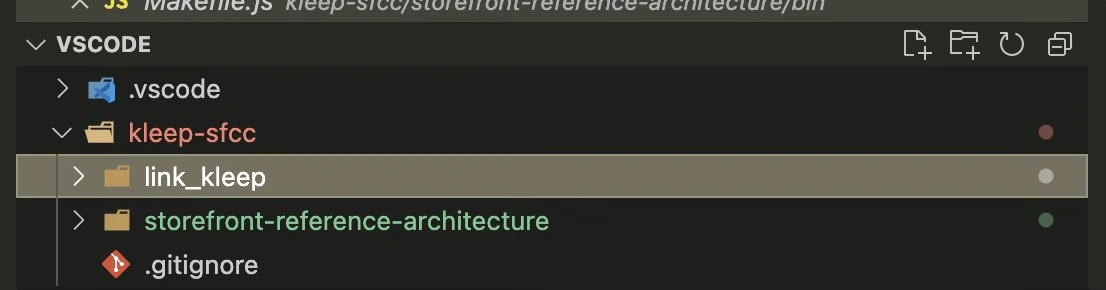
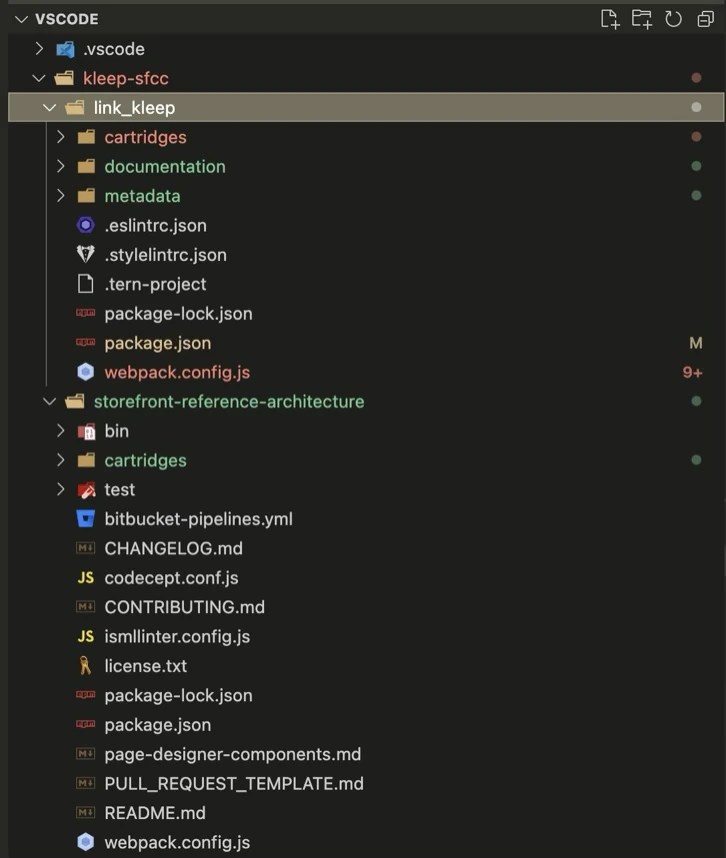
- Install the dependencies from the extracted directory:
- Compile the frontend files from the Kleep project:
- Create a dw.json file in the same directory with the following content:
- hostname is the hostname of your sandbox—for example: “zzaa-001.sandbox.us01.dx.commercecloud.salesforce.com”
- username and password are your account manager credentials
- version is the active code version listed in Administration > Code Deployment—for example, “version1”
- Upload the Kleep cartridges to your active code version:
- Go to Administration > Development Setup > Folder Browser > Cartridges and verify that the Kleep cartridges are uploaded.
Assigning cartridges to the site
- Go to Administration > Sites > Manage Sites.
- Select your site from the Storefront Sites list:
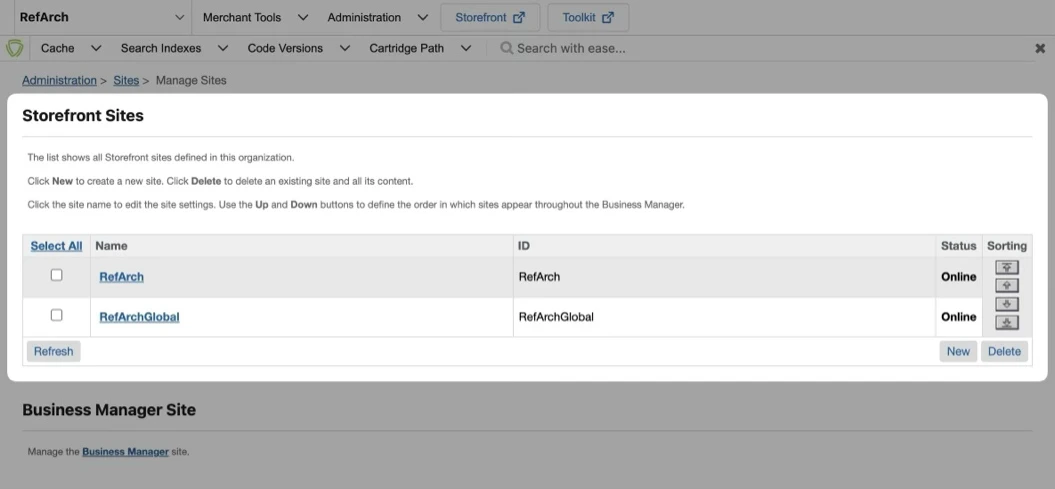
int_kleep_sfra:int_kleep
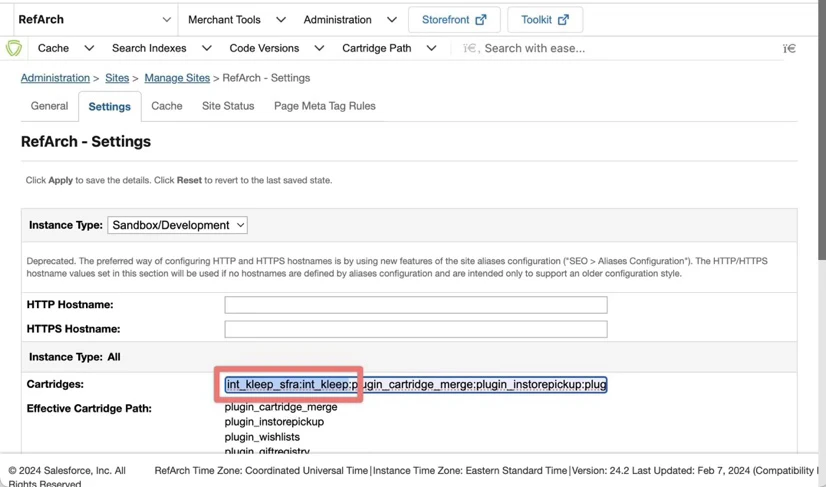
- Go to Administration > Sites -> Manage Sites and click the link in Manage the Business Manager site section.
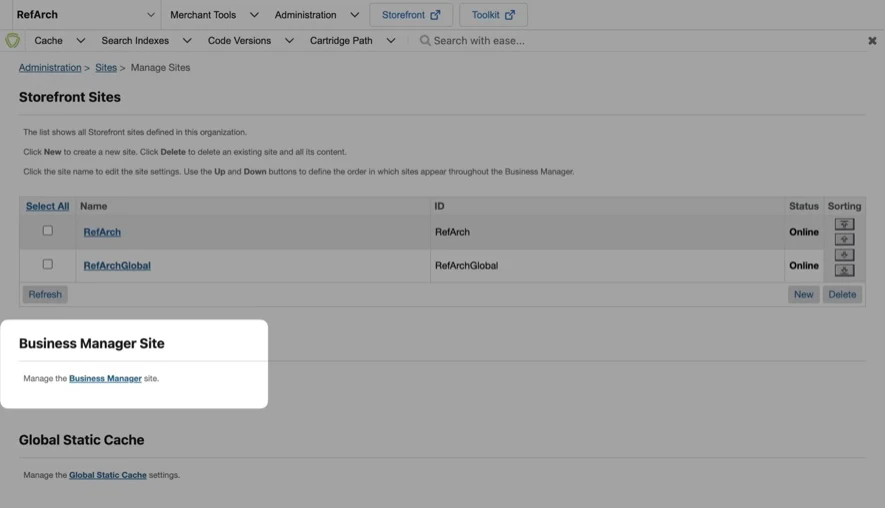
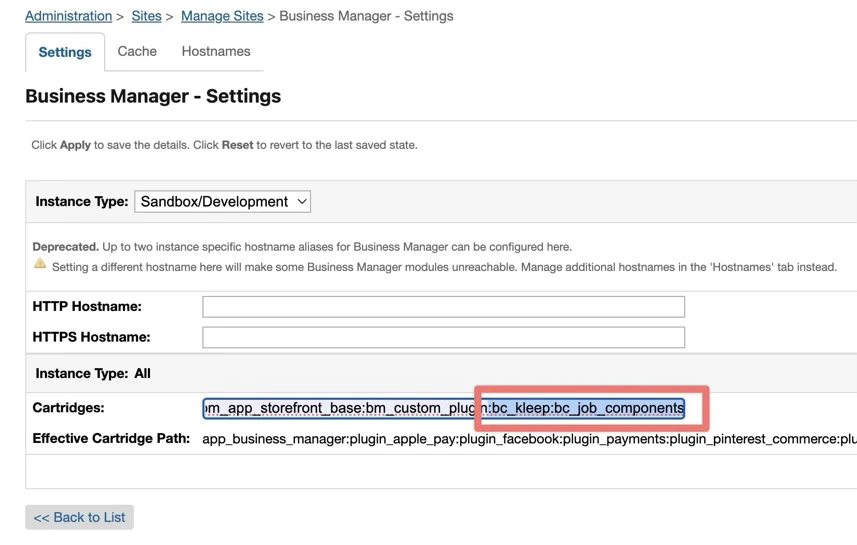
bc_kleep:int_kleep” in the Cartridges textbox, separated by “:” if using multiple cartridges. Please refer to the screenshot below:
Import of metadata
Go to Administration > Site Development > Site Import & Export. Upload kleep-metadata.zip containing the metadata folder.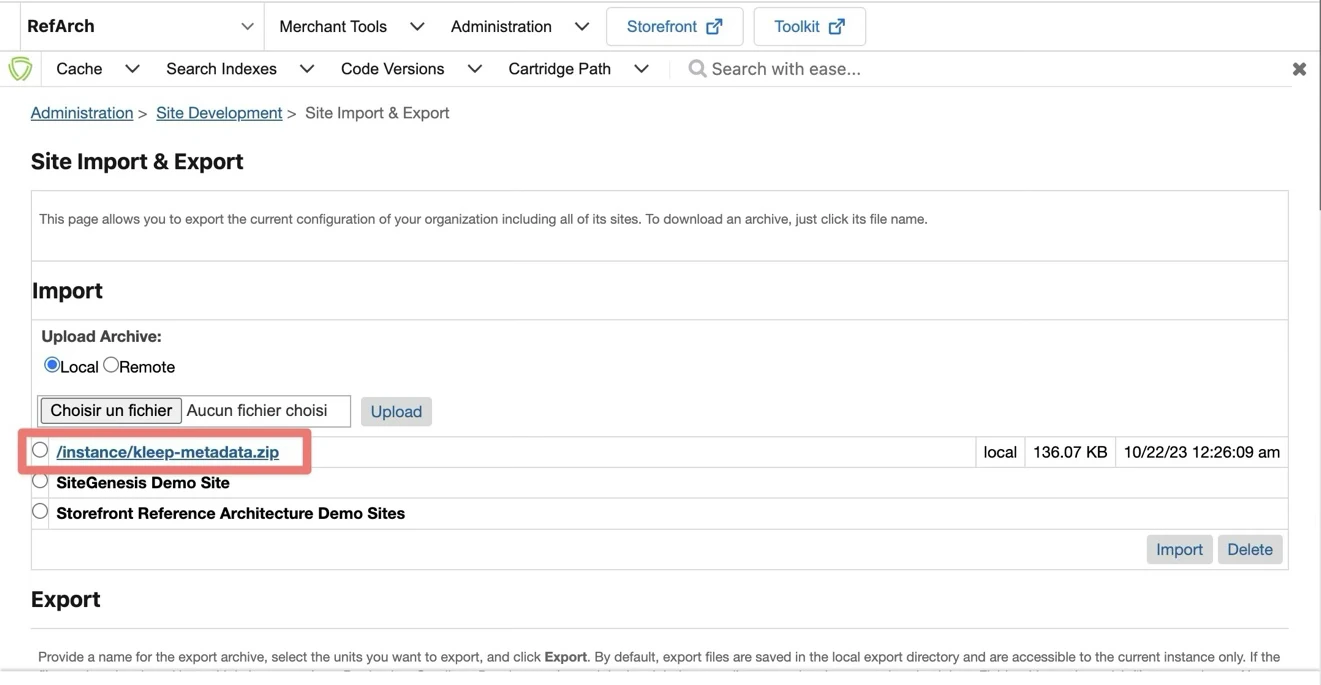
Configuration
Custom Site Preferences
After import is successfully done, you should see Site Preferences in BM > Merchant Tools > Site Preferences > Custom Preferences.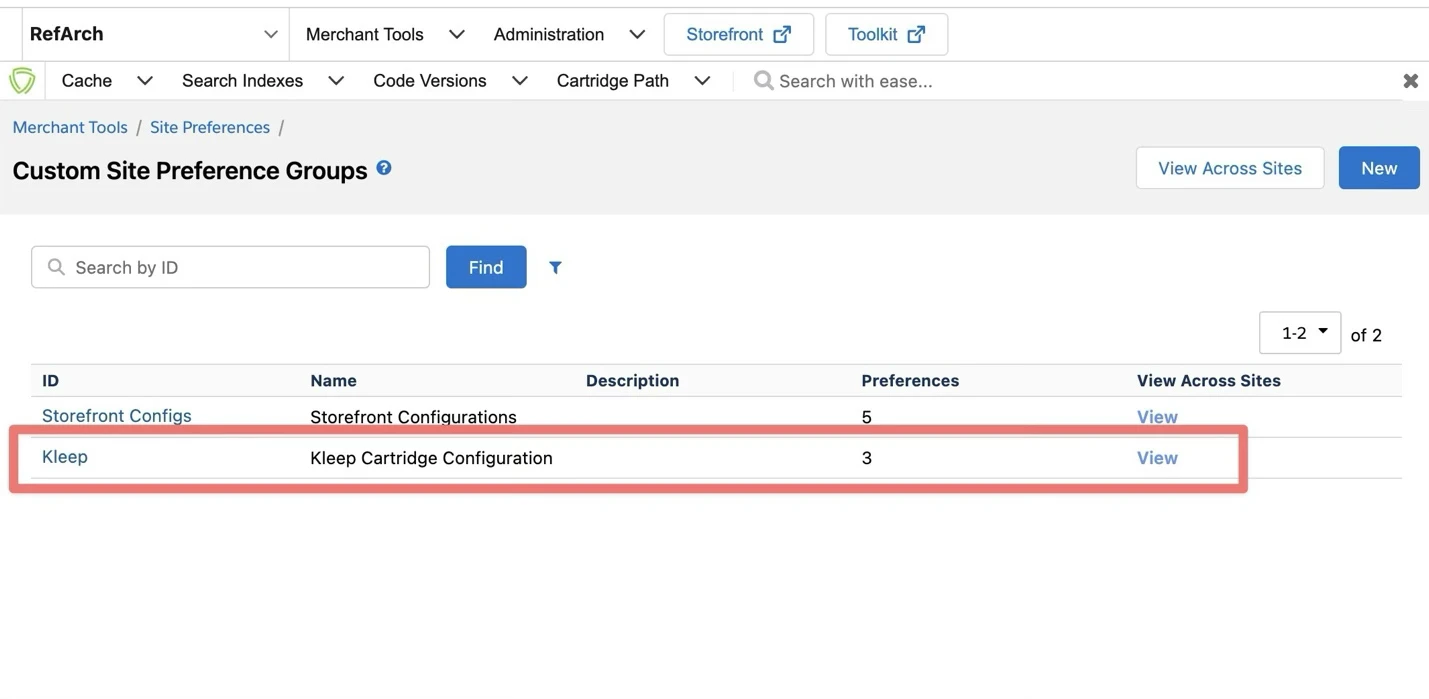
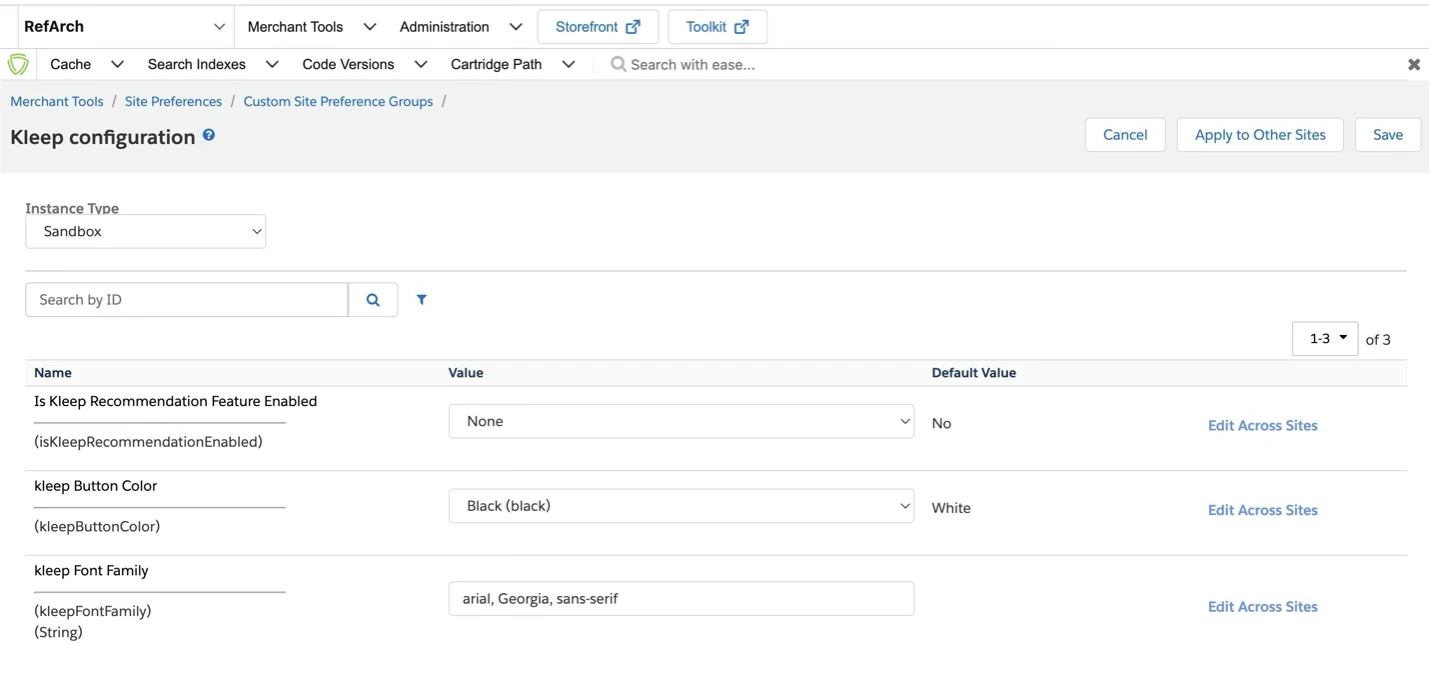
| Site Preference ID | Site Preference Display Value | Site Preference Description |
|---|---|---|
| isKleepRecommendationEnabled | Enable Kleep Recommendation feature | Enable/disable Kleep Recommendation feature used in PDP. |
| Doesn’t affect tracking and Job exports features. | ||
| kleepButtonColor | Kleep button color | This is the Kleep button color in PDP, Cart, and Checkout. You can select Black or White, or override the CSS if you need custom frontend integration. |
| kleepFontFamily | Kleep Font Family | The Font family used to override Kleep fonts (applied on Kleep button and Kleep iFrame). It is sent as a parameter when you click on the CTA to apply it into the iFrame. |
| isKleepSessionEnabled | is Kleep Session Feature Enabled | Enable/Disable session UUID logic creation. If set to false, will break tracking and dashboard / KPI computation. |
| kleepCountryCode | kleep market code | Market / Country Code following the ISO 3166 A-2 convention |
Services
These are the Services used by Kleep to send requests and get iframe and other call responses. You can find them in Administration > Operations > Services.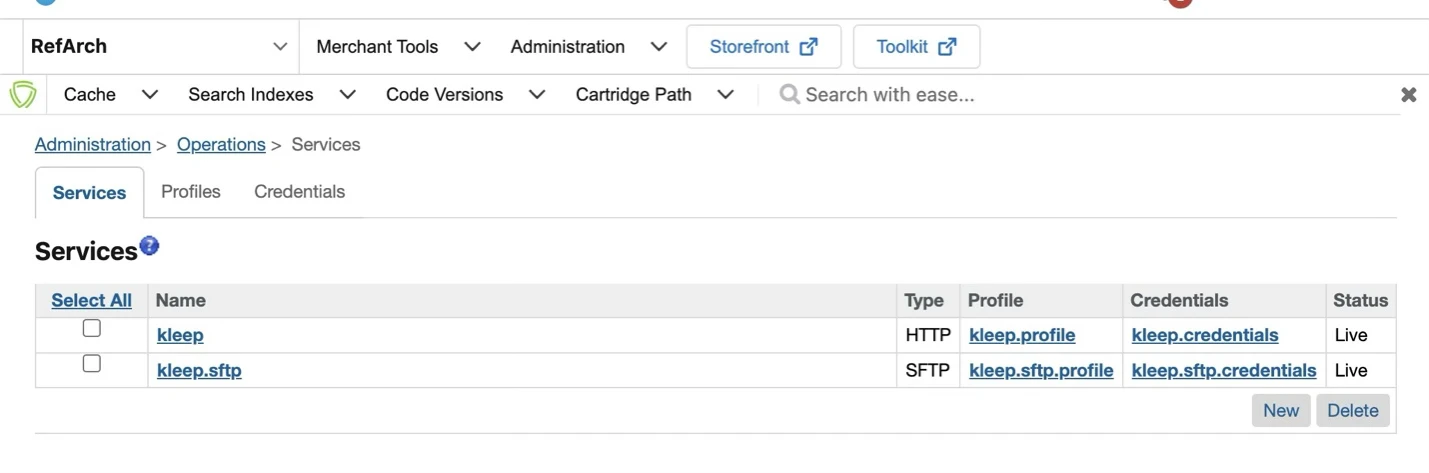
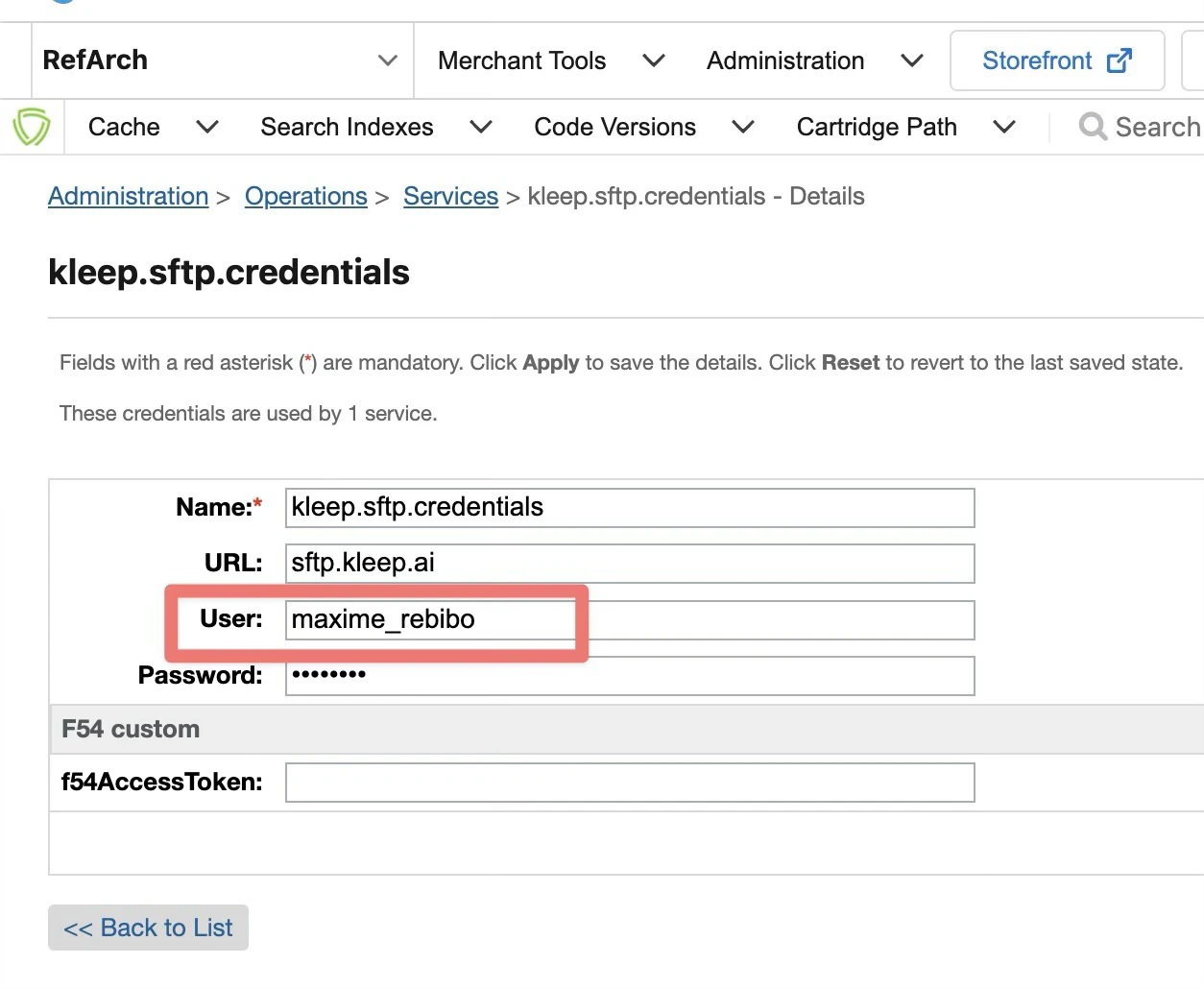
Private key and Certificate
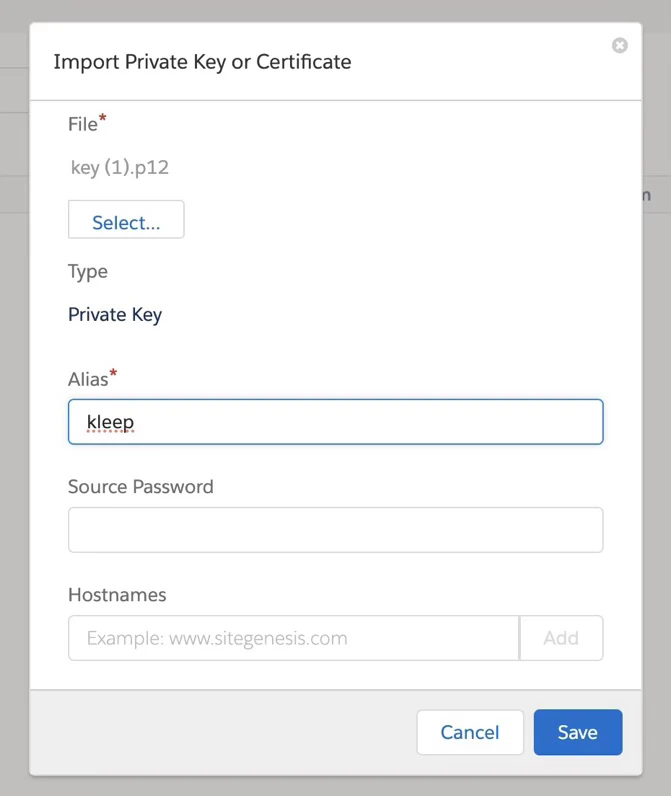
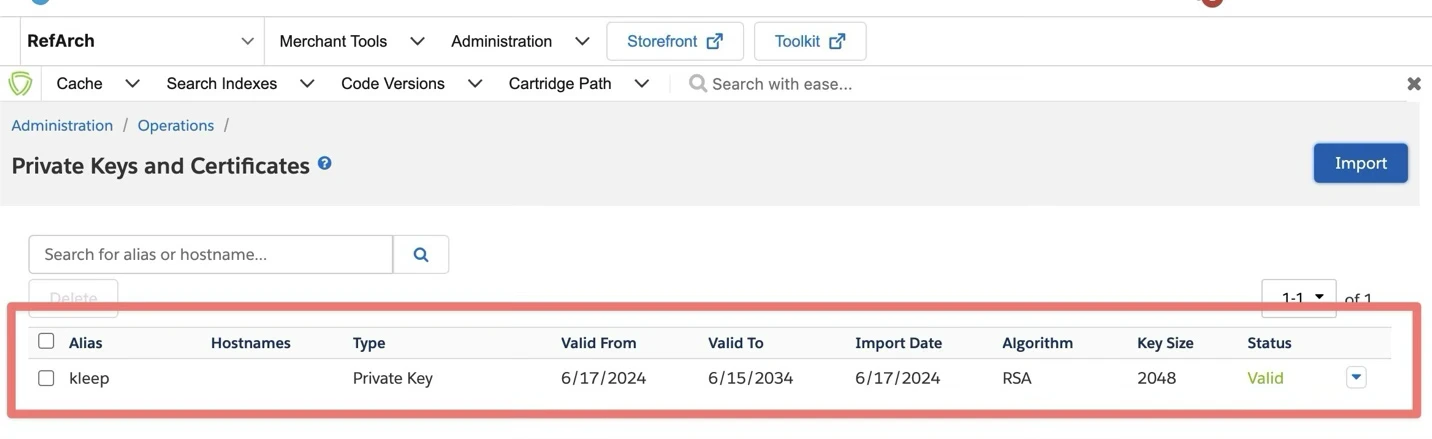
Go to Administration > Operations > Private Keys and Certificates to prepare the usage of certificate for SSH connection to the Kleep server:- Click “Import” button
- Click “Select” button and select the .p12 file provided by Kleep
- Use “kleep” value in the alias input field
- Click “Save” button
Jobs
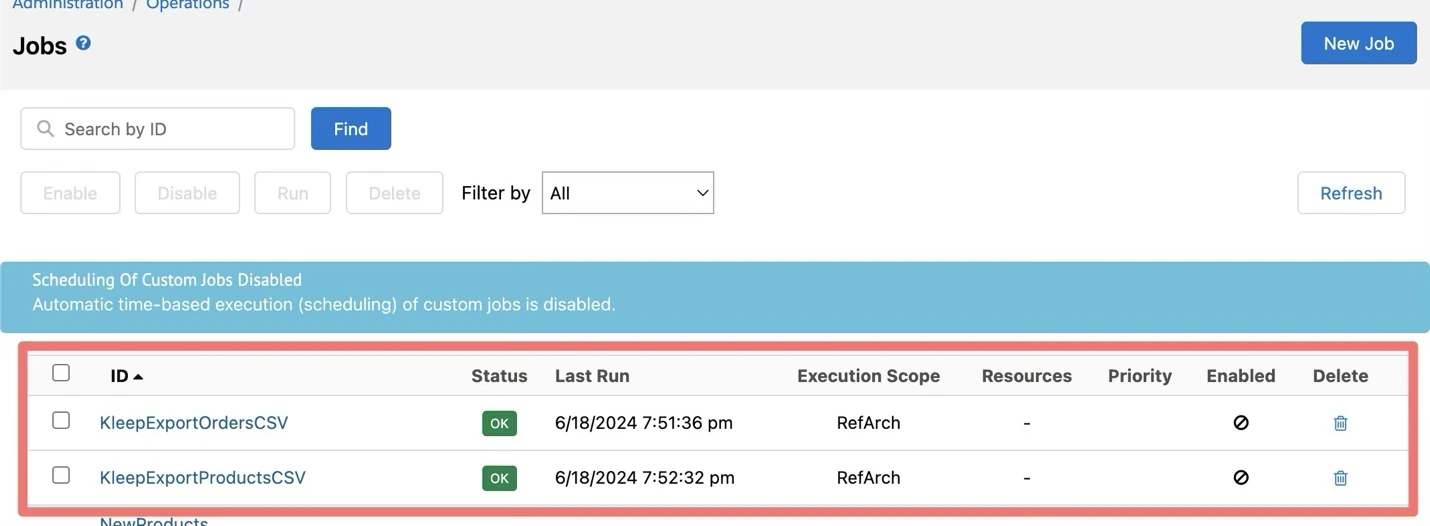
Go to Administration > Operations > Jobs, there are two SFCC jobs prepared to export:- The products used by your sites.
- The orders history of your customers.
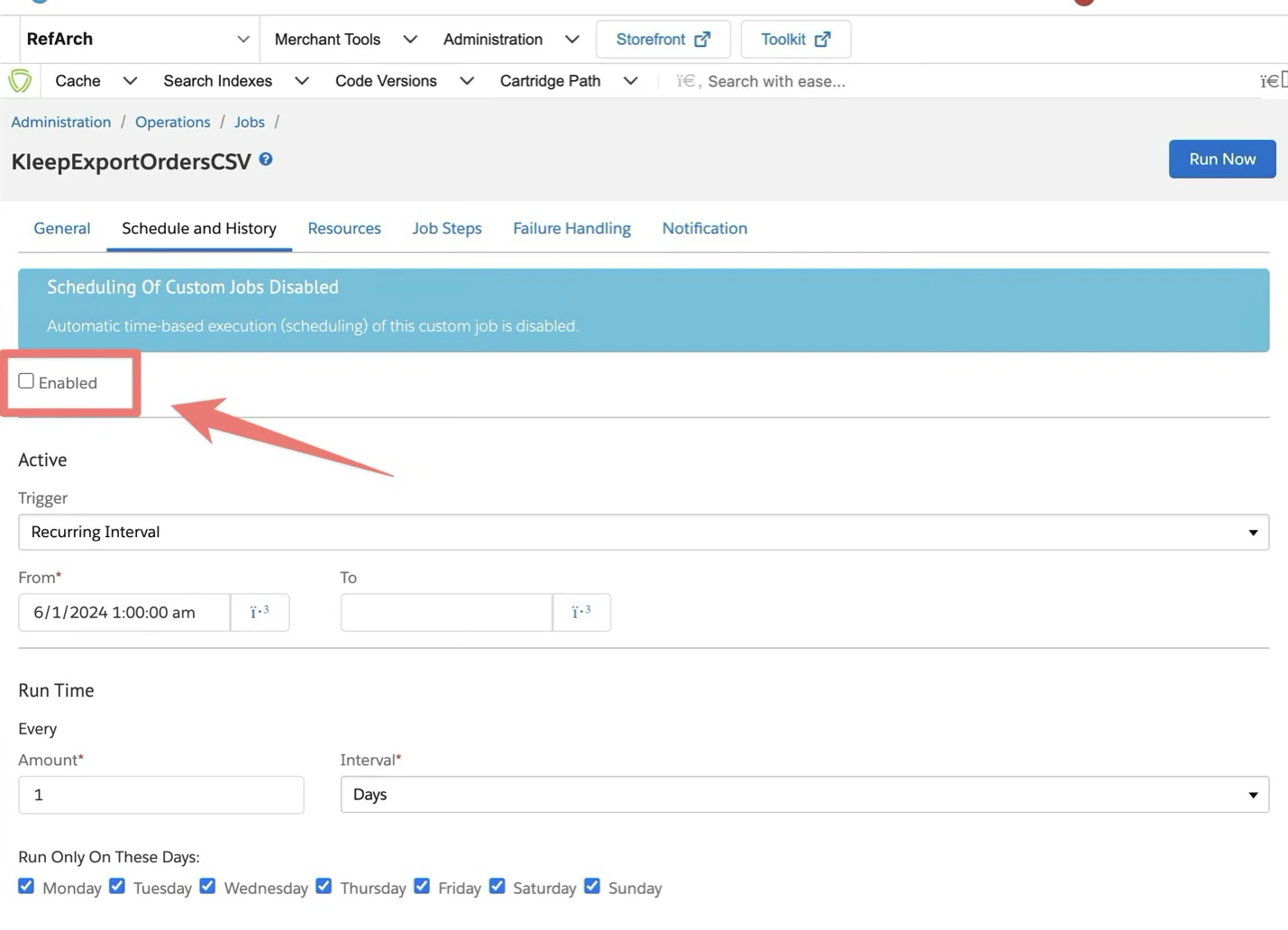
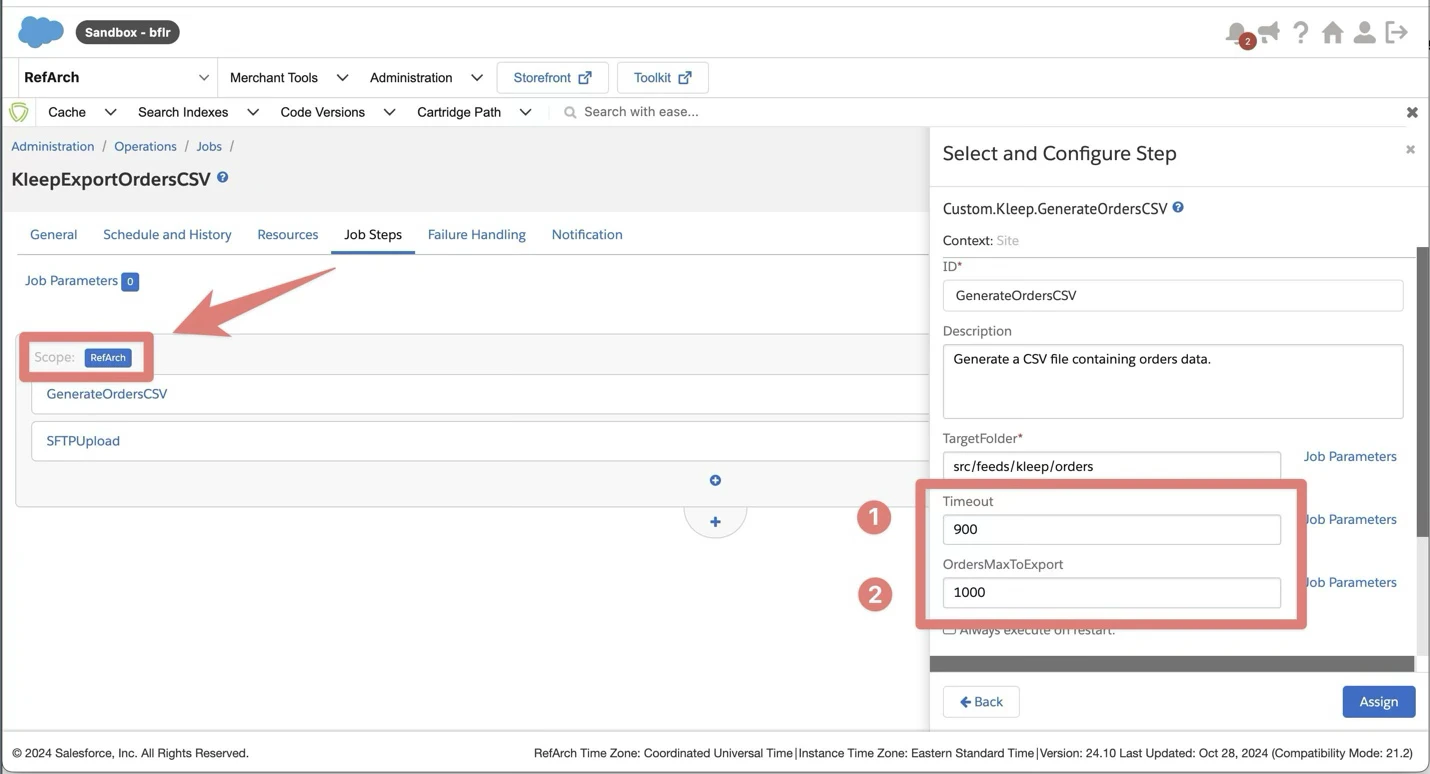
- Go to “Job Steps” tab
- Click “RefArch” site to select the sites where you need to use Kleep.
- Timeout: The ****timeout (in seconds) before stopping the export process.
- OrdersMaxToExport: the maximum number of orders to export before stopping the export process.
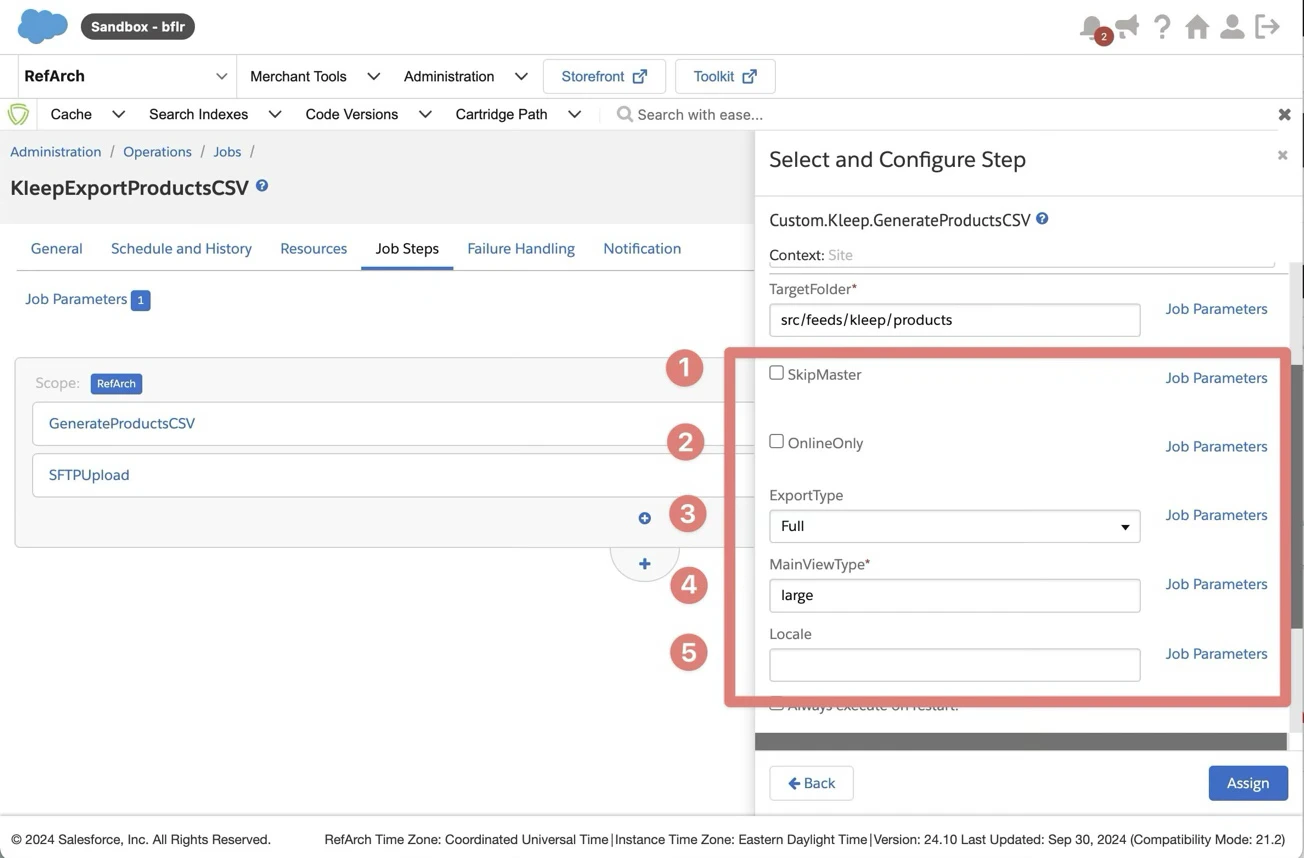
- SkipMaster parameter is used to ignore the master products exports. Disabled by default.
- OnlineOnly parameter is used to export only online products (ignoring offline ones). Disabled by default.
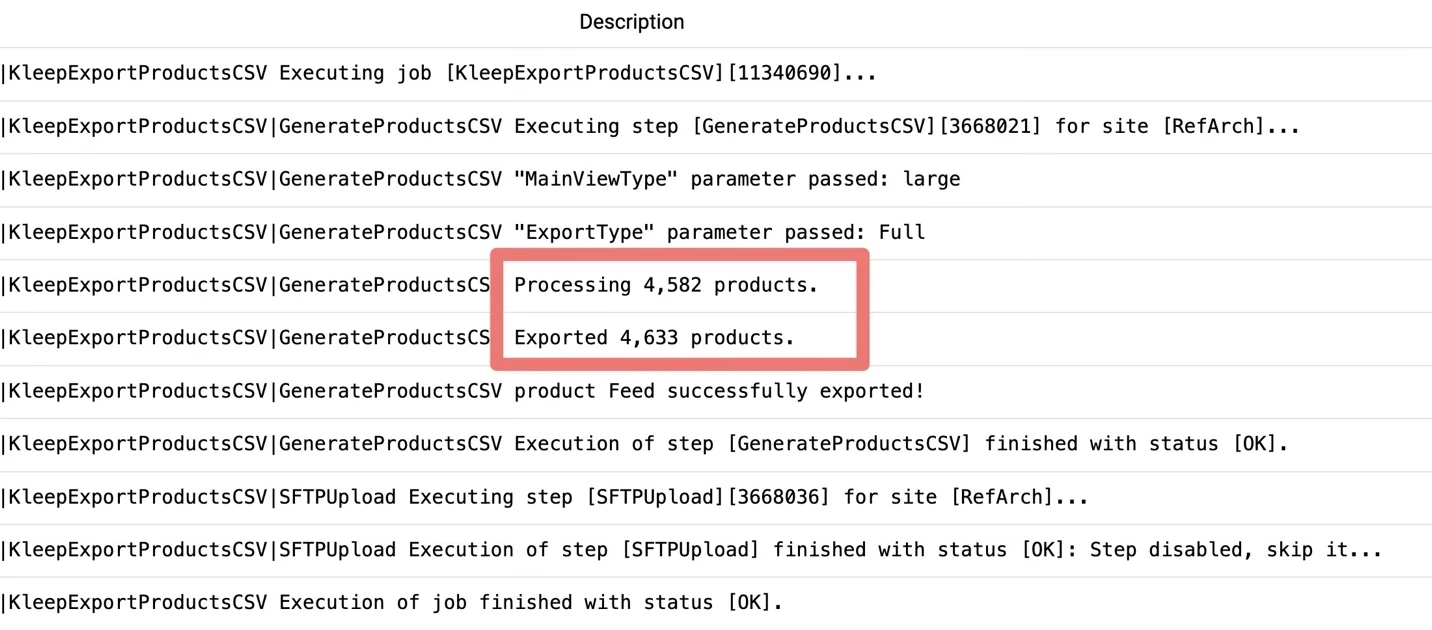
- ExportType parameter is used to choose between a Delta (to update only updated products since the last export) or a Full export. “Delta” by default.
- MainViewType parameter is used to export the main product image URL. “large” is the default value. Please replace it by the main view type you configured to display product images in the PDP.
- Locale parameter is used to export specific locale information. The default locale is used if empty.
Stocks using OCAPI
Kleep queries stocks live to reflect current stock availability and check whether recommend sizes that are out of stock. To do so, we ask you to create an OCAPI user with specific authorizations:- Open OCAPI Settings: Navigate to the Business Manager. Under the section Administration > Site Development > Open Commerce API Settings, edit the settings for the “Data” API.
-
Set Up Client ID: For testing environments, you can use the following client ID:
"client_id": "aaaaaaaaaaaaaaaaaaaaaaaaaaaaaa"For production environments, you must generate a new client ID. Follow the Salesforce documentation on how to generate an API Client ID. A video is also available here: https://www.youtube.com/watch?v=Z3cZlQHWjtM -
Configure Resource Access: Add the following configuration snippet to your OCAPI settings under the “Data” API configurations. This setting grants read access to product inventory records, ensuring that Kleep can check the availability of specific sizes.
-
Confirm Configuration and sends to Kleep the list of following information:
Custom Code
Update your templates
Note: all changes are already made in the int_kleep_sfra cartridge. You can remove the kleep SFRA templates inint_kleep_sfra/cartridge/templates/default folder if you have already overridden these files in your custom brand cartridge.
KLEEP BUTTON (+ KLEEP PRODUCT TRACKING)
To include the Kleep button in the PDP, you need to add this line to your custom app_custom_brand/cartridge/templates/default/experience/components/dynamic/product/productDetails.isml ****file, and in the app_custom_brand/cartridge/templates/default/product/productDetails.isml file:
app_custom_brand/cartridge/templates/default/checkout/confirmation/confirmation.isml template right after this bloc of code:
4. Operations, Maintenance
Data Storage
Files
Data used for synchronization between SFCC site and Kleep are stored in CSV files in Administration > Site Development > Development Setup > Impex directory in thesrc/feeds/kleep/orders and src/feeds/kleep/products folders. The folder is created automatically after the first start of the job.
Custom Objects
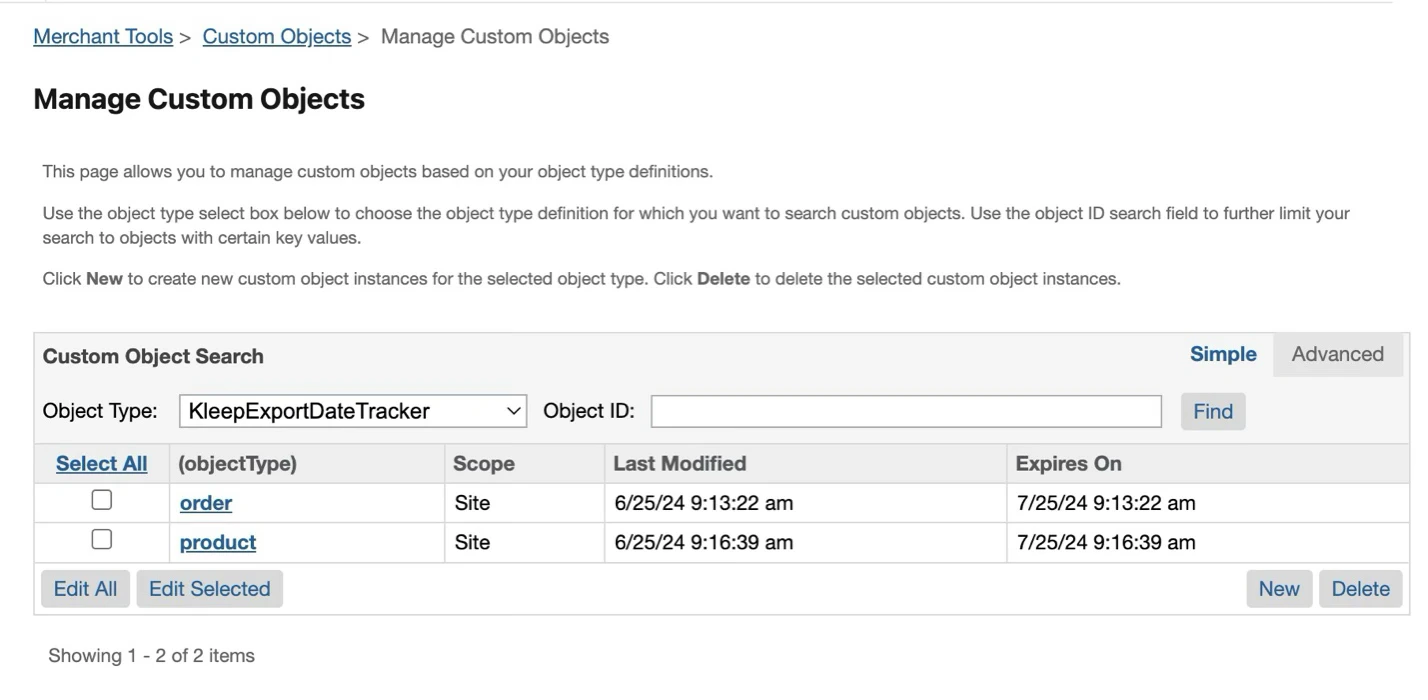
- 1 new Custom Object Type is created: KleepExportDateTracker
- 2 custom objects are created and used to store the last export date for each job:
- “product” (containing the last export date for KleepExportProductsCSV)
- “order” (containing the last export date for KleepExportOrdersCSV)
5. User Guide
Storefront Functionality
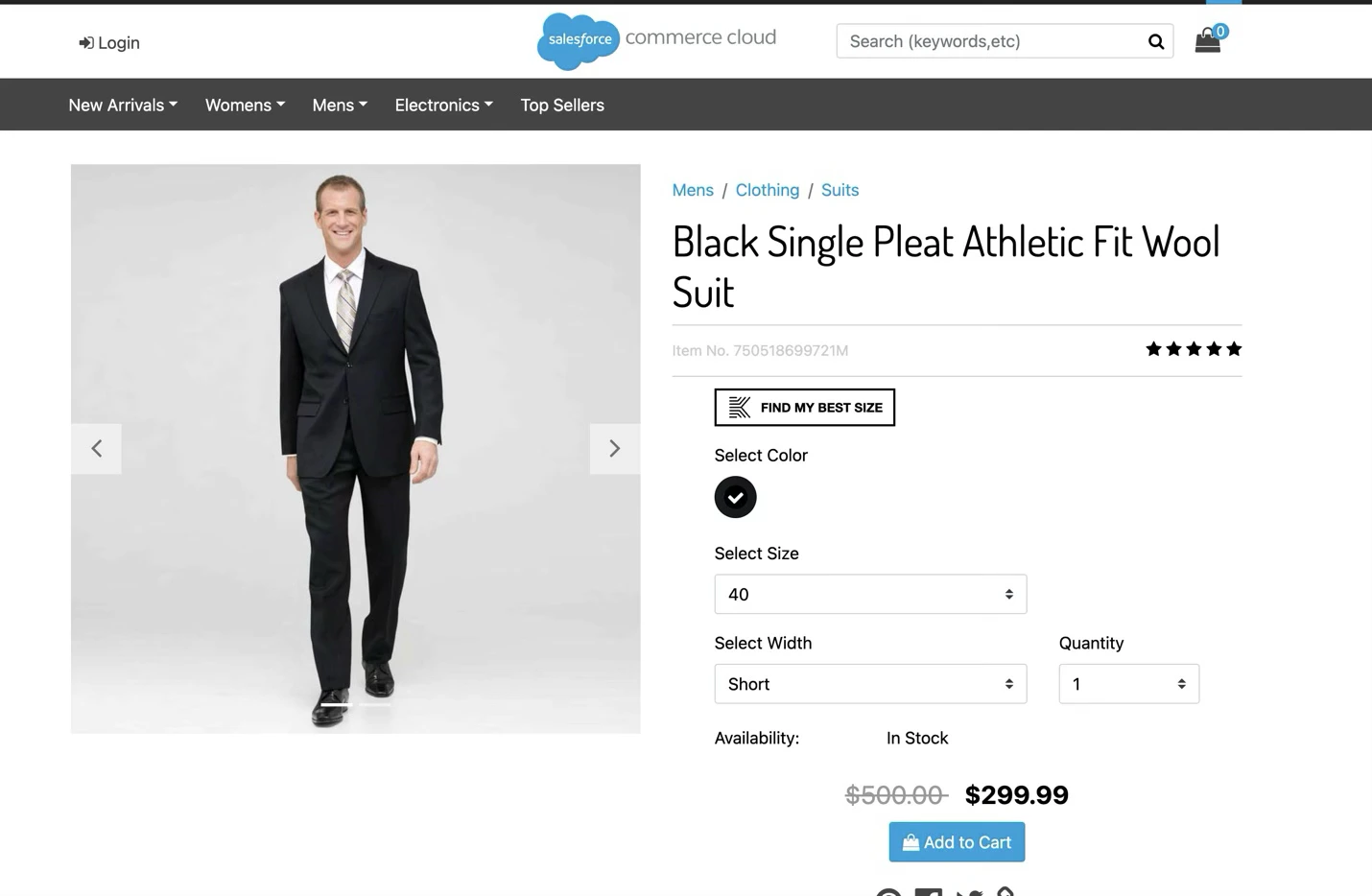
1. FIND MY PERFECT SIZE
This is the main feature of Kleep. The display condition of the Kleep button in the Product Detail Page is effortlessly managed through a plug-and-play approach during cartridge initialization. Follow these steps to control the visibility of the Kleep button:- Activate isKleepRecommendationEnabled Site Preference:
- Ensure that the site preference isKleepRecommendationEnabled is activated within your Salesforce Commerce Cloud (SFCC) environment. This preference serves as the master switch to control the visibility of the Kleep button.
- Plug-and-Play Initialization:
- The logic for handling the display condition of the Kleep button is seamlessly integrated during the cartridge’s initialization.
- The code is designed to dynamically adapt to your environment, adding or removing the Kleep button based on your specified conditions (middleware added to the Product-Show controller action)
- Endpoint Call to Kleep:
- Internally, the cartridge automatically makes an endpoint call to Kleep, passing the ProductID as a parameter.
- The response from Kleep determines whether the button should be displayed or hidden.
- Customization:
- Customize the conditions within your internal code logic to align the Kleep button’s visibility with your specific business rules.
- ProductID
- KleepCustomerID
- Domain name (referrer)
- language
2. Recommended size add to cart
At the end of the process, you get the recommendation from Kleep. When hitting “Ajouter la taille S au panier”, the iFrame sends an event and the selected size is added to cart.3. Dynamic changing button label
When you close the popin, the button label is changed with the recommended size: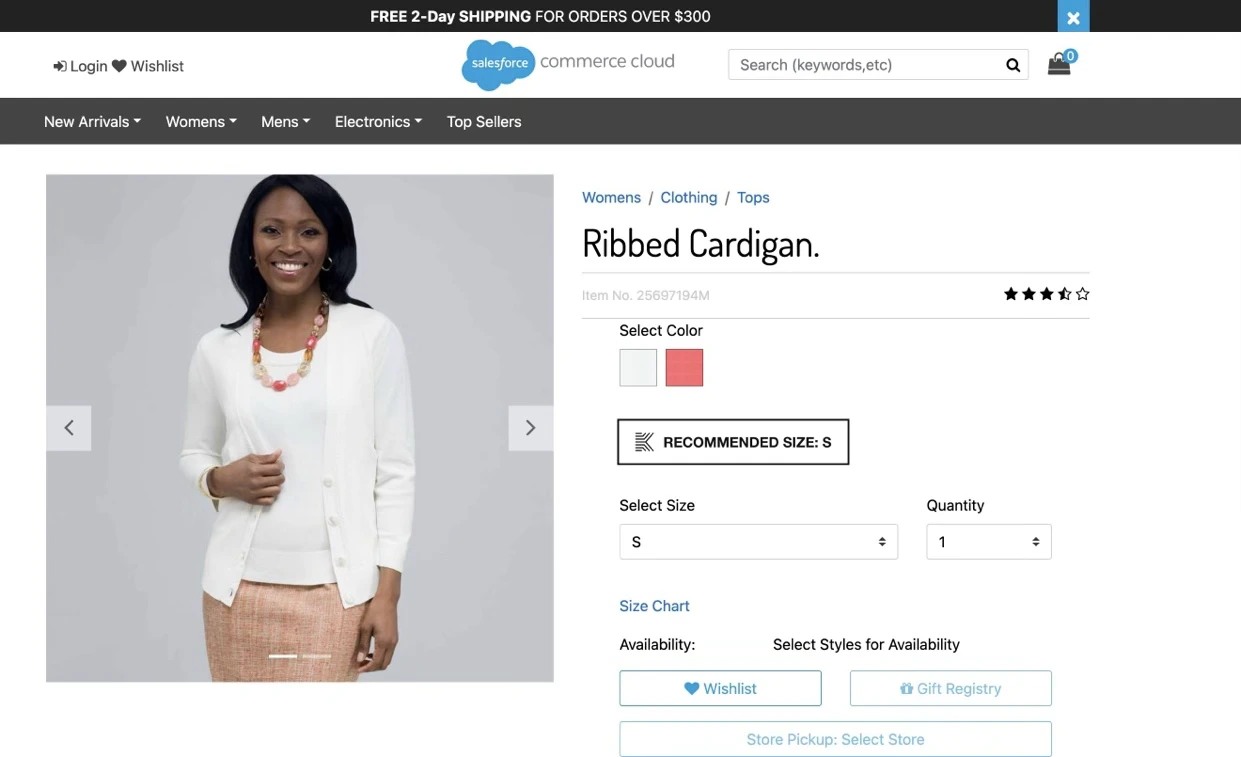
- Initial Label: “Find My Perfect Size”
- Updated Label: “Recommended Size: S” (S is an example)
4. Tracking
Analytics data is automatically sent to Kleep when:- a product is viewed (PDP loaded, or new variation selected)
- a product is added to cart (in PDP)
- an order is ready to be placed (end of checkout, before placing order)
- an order is confirmed (order confirmation page)
5. Anti-Bracketting
Coming soon…6. Known Issues
- The Kleep button and the product tracking events (product_viewed and product_added_to_cart) are not working with the quick view (from the PLP).
- The KleepExportProductsCSV job with “ExportType” parameter set to “Full” is limited to catalogs with less than 20 000 master products because of the api.jsCollectionSize quota
7. Release History
| Version | Date | Changes |
|---|---|---|
| 24.6.0 | 2024-06-10 | • Initial release |
| 24.7.0 | 2024-07-03 | Enhancements: |
| • Product Export Optimization: Updated the KleepExportProductsCSV job to export only delta products based on their lastModified date, rather than exporting the entire catalog daily. This enhances efficiency by reducing data processing and transfer load. | ||
| • Image URL Handling: Switched from relative to absolute URLs for product images in Kleep tracking, ensuring consistent access across different platforms and services. | ||
| • Custom Objects Usage: Enhanced the utilization and management of Custom Objects within the system for improved data handling. | ||
| • API Call Optimization: Optimized Kleep API calls by eliminating unnecessary service calls in certain scenarios, enhancing performance and reducing overhead. |
- Metadata Archive: Fixed the absence of the ‘kleepLastExported’ attribute in the metadata archive.
- API Compatibility: Improved compatibility with API Version 21.2 when generating the Kleep recommendation modal URL (PDP)
- Export Performance Improvement: Enhanced the KleepExportProductsCSV job by:
- Adjusting the export jobs chunk size from 1000 to 100 for better monitoring and performance.
- Removing empty and duplicate lines to clean up data quality and reduce file size.
- Improving export speed for a more efficient data processing experience.
- Improving logs for better debugging, enabling more precise tracking and understanding of execution processes.
- Adding automatic trimming of values from the MainViewType
- Flexible Export Options: Introduced an ExportType parameter in export jobs, allowing users to choose between Delta and Full export without manually deleting the KleepExportDateTracker CustomObject.
- Enhanced Data Inclusion: Added assigned categories’ names and IDs to the export file from the KleepExportProductsCSV job, enriching the dataset for uncategorized products.
- Job Status Reporting: Fixed an issue where a job’s status displayed as “OK” in the BM user interface while it was “ERROR” in the backend.
- Custom Object ‘KleepExportDateTracker’ Creation: Corrected a bug that prevented the creation of the ‘KleepExportDateTracker’ custom object when an error occurred in jobs.
- KleepExportProductsCSV Job: Enhanced the ‘KleepExportProductsCSV’ job to include variants from variation groups when master products are uncategorized. | | 24.10.1 | 2024-10-21 | Enhancements:
- KleepExportProductsCSV Job Improvements:
- Enhanced to include all variants and variation groups from a master product when at least one variant or variation group is categorized.
- Updated the export quota limit to 20,000 master products.
- Introduced a new “SFCC_Product_VariationGroups_ID” column in the CSV export file to better represent product hierarchies
- Remove useless “[BRAND]” configuration in job step
- KleepExportOrdersCSV Job Improvements:
- Filter on orders with “Exported” status only
- Remove useless “[BRAND]” configuration in job step
- PDP Improvements:
- Added the ability to add multiple Kleep Recommendation CTA anywhere in the PDP
- Removed CTA loading spinner
- Improved accuracy with recommendation results by:
- Checking the inventory in real time before suggesting a specific product.
- Adding new button_clicked tracking event.
- Updating the tracking events data structure.
- Resolved an issue in the KleepExportOrdersCSV job that occurred when processing orders with notes. | | 24.10.2 | 2024-10-23 | - Updated recommendation modal URL | | 24.11.0 | 2024-11-06 | Fixes:
- Resolved an issue where the “SFCC_custom_attributes” column was missing data in the KleepExportProductsCSV and KleepExportOrdersCSV export jobs.
- Ensured that the KleepExportOrdersCSV job functions correctly when using the Full export option, without any restrictions.
- Removed the limitation of exporting only 1000 orders in KleepExportOrdersCSV; now exports without any restrictions.
- Enhanced logging capabilities for both KleepExportProductsCSV and KleepExportOrdersCSV export jobs.
- Introduced a retry feature in KleepExportOrdersCSV to handle failed order exports without affecting the processing of other orders. | | 24.11.1 | 2024-11-08 | Enhancements:
- Localized PDP CTA: Added translations for the CTA button on product detail pages in French, Japanese, Spanish, Portuguese (Portugal and Brazil), Italian, Korean, German (Germany, Belgium), and Dutch (Netherlands).
- Removed PDP CTA logo | | 24.11.2 | 2024-11-12 | Fixes:
- Added a new boolean custom attribute, isKleepExported, to track whether orders/products have been exported. This change addresses inconsistencies in querying orders based on the kleepLastExported or kleepLastExportedFailure attributes.
- Fixed an issue where a stringified empty object was exported for custom attributes. It’s now an empty string.
- Custom Timeout: Implemented a custom timeout parameter for jobs, set to 15 minutes (900 seconds) by default
- Maximum Order Limit: Introduced a parameter to limit the number of orders processed per job execution, set to 1000 orders by default
- Order Reset Job: Added a new job to reset the export status of orders, setting kleepLastExported to null and isKleepExported to false, preparing them for re-export.
- Delta Export Mode: Removed the Delta/Full parameter for orders; all exports are now automatically handled in delta mode. If a job stops due to an error, reaching the maximum number of processed orders, or timeout, the remaining orders will be exported in the next run. | | 25.09.0 | 2025-09-22 | Enhancements
- New session logic with creation of unique session UUID upon each new session creation, allowing to track and compute session-based client KPIs. Session UUID is shared with iFrames and allows to reconciliate External and Internal tracking.
- Support of multiple categories: Shoes, Kids, Lingerie
- Harmonization of domains handler
- 2 new custom preferences to define site market (used to differentiate KPIs per market and for flow personalizations) and session logic enabler
- Enhanced internal tracking reliability with postMessage-based triggers |